


 SKU: SWATEMMINIBPR
Blackmagic Design ATEM Mini Pro HDMI Live Stream Switcher
Blackmagic Design ATEM Mini Pro HDMI Live Stream Switcher
In stock
View full details WhatsApp us for inquiries

Blackmagic ATEM Mini Pro HDMI Live Stream Switcher in UAE: Guide
Considering the complete platform, The Blackmagic ATEM Mini Pro is a professional live broadcasting switcher developed for content creators, businesses, and workflow teams in the UAE. It permits you to connect up to 4 HDMI bodies and stream straight to platforms such as YouTube, Facebook, and zoom without requiring outboard applications.
Key capabilities of ATEM Mini Pro
- 4 HDMI inputs for multi-camera production
- Built-in hardware streaming engine (no computer required)
- USB output for webcam use
- Multiview output for monitoring all sources
- Record directly to USB drives
- Supports live switching, transitions, and effects
Why Choose ATEM Mini Pro?: Guide
Unlike basic HDMI switchers, the ATEM Mini Pro incorporates a built-in encoder, enabling you to stream straight to the internet. This makes it excellent for professional and commercial use in Dubai and across the UAE.
- Live events and conferences
- Church streaming setups
- Corporate webinars
- YouTube content creation
- Online training sessions
Who Should Buy This?: Guide
This device is well suited to:
- Video production companies in UAE
- Content creators and YouTubers
- Event management companies
- Educational institutions
ATEM Mini vs ATEM Mini Pro: Guide
The ATEM Mini Pro provides advanced capabilities such as immediate streaming and USB capture, making it a better selection for professional processes compared to the conventional ATEM Mini.
| Feature | ATEM Mini | ATEM Mini Pro |
|---|---|---|
| HDMI Inputs | 4 | 4 |
| Streaming | No | Yes |
| Recording | No | Yes (USB) |
| Multiview | No | Yes |
What’s Included: Guide
- ATEM Mini Pro switcher
- Power adapter
- User manual
Frequently Asked Questions: Guide
Q: Can ATEM Mini Pro stream eliminating a PC?
Yes, it has a built-in hardware encoder for immediate streaming.
Q: How many bodies can I connect?
You can connect up to 4 HDMI bodies.
Q: Is it appropriate for YouTube broadcasting?
Yes, it is optimized for platforms such as YouTube and Facebook.
Q: Does it compatibility capture?
Yes, you can capture directly to outboard USB drives.
Buy ATEM Mini Pro in UAE: Guide
Seeking to purchase Blackmagic ATEM Mini Pro in Dubai or anywhere in the UAE? This live stream switcher is excellent for professional studios, event companies, and material creators across the region. We supply fast delivery, competitive pricing, and dependable support for all Blackmagic devices.
How ATEM Mini Pro Improves Your Live Streaming Setup: Guide
The ATEM Mini Pro streamlines multi-camera workflow by combining switching, streaming, and capture into a one device. Instead of relying on several tools, operators can control footage sources, attach transitions, and stream straight via Ethernet through the built-in encoder. This lowers setup complexity and enhances reliability for live broadcasts.
For operators who need enhanced recording functions, consider the Blackmagic ATEM Mini Pro ISO HDMI Live Stream Switcher , which permits capture of each camera source separately for professional post-production processes.
Why Buy ATEM Mini Pro from Us in UAE?: Guide
- Fast delivery across Dubai and UAE
- Genuine Blackmagic products
- Competitive pricing
- Support for professional video equipment
ATEM Mini Pro vs ATEM Mini Pro ISO: Guide
While both versions offer 4 HDMI sources and live broadcasting, the ATEM Mini Pro ISO incorporates recording of individual footage sources, allowing full post-production editing and process latitude.
Introduction: Guide
The ATEM Mini Pro by Blackmagic Configuration, much Such as its predecessor, the ATEM Mini, is a versatile four-input live workflow switcher equipped with a built-in control panel. It is specifically developed for multi-camera live broadcasting in up to HD footage quality, catering to numerous applications, such as gaming systems, corporate PC streams, or HD bodies. The ATEM Mini Pro supplies several enhancements over the Mini, among them live stream files rate and status details, a built-in hardware encoder, simultaneous capture to USB drives, disk hot swapping with the Blackmagic MultiDock, extra capture and stream keys, stream caching, a timecode generator, program preview multiview, tally compatibility, and compatibility with Blackmagic Configuration Pocket Cinema camera 6K and 4K for use as broadcast inputs.
Rear-Panel Setup: Guide
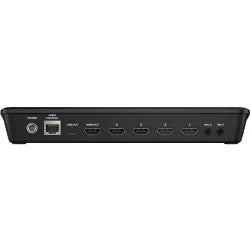
The ATEM Mini Pro retains the identical rear-panel configuration as the previous model, featuring four HDMI sources that compatibility up to 1080p HD footage. Additionally, it delivers an HDMI feed for connecting to a projector or for multiview observation, a USB Type-C feed for HD footage capture to a computer, and a RJ45 10/100/1000 Ethernet port for immediate live broadcasting, system handling, off-site control, and upgrades. You can refine frame rate depending on the fidelity of your stream, and there is no requirement for extra streaming software since the Pro incorporates a built-in hardware encoder. The revised ATEM Applications Control Interface is employed for control and configuration of the ATEM Mini Pro through USB-C or Ethernet, and it permits you to display the files rate, audio meters, configuration, and status of your live feed. The built-in colour control interface has the identical configuration of DaVinci Resolve, removing any learning curve. Enhanced elements incorporate the capacity for engineers to upload a XML configuration file to make it easier to change all your parameters at after.
Buttons and operation Surface
The control surface of the ATEM Mini Pro remains user-friendly, built around backlit control keys for selecting camera sources, managing transitions, keyers, parameters, and the DVE (Digital Footage Effects). Notable additions to the control surface incorporate a quick capture button for instant live stream capture to a linked USB source, as well as hot-swapping drives whenever using the Blackmagic MultiDock for efficient post-production editing. The inclusion of On-Air and Stream keys enables seamless stream activation and deactivation after configured in the applications control. Furthermore, Footage Out keys deliver been incorporated on the right side, enabling the selection of a program preview for every source, maintaining readiness for live broadcast.
Keying capabilities
The ATEM Mini Pro integrates the identical upstream and downstream keyers, an enhanced chroma keyer, two linear/luma keyers, a DVE transition keyer, a response generator, and color generators. Additionally, support extends to media player operation for fill and key pictures, accommodating up to 20 stills in a range of formats such as PNG, TGA, BMP, JPEG, and TIFF.
Webcam Option: Guide
If you're broadcasting, then all versions use USB as a webcam. The ATEM Mini Pro links via its USB-C to a PC, and your PC will recognize ATEM Mini Pro as a webcam source in your broadcasting software such as Skype.
Transitions: Guide
Provided transitions include:
CutMixDipWipeDVE
ATEM Mini Pro Upstream Keyer: Guide
Layer live footage over other footage inputs or graphics with the Upstream Keyer. You can use luma principal, linear principal, pattern principal, or shoot against a green display and use chroma principal to instantly composite the footage over virtual locations.
ATEM Mini Pro Downstream Keyers: Guide
The ATEM Mini Pro switcher incorporates one downstream keyer, so you can attach high-quality graphics such as logos, bugs, and titles from the built-in media subject over the live stream program feed.
ATEM Mini Pro sound Mixer
The built-in audio mixer lets you control both body and outboard audio with accuracy level and equilibrium adjustments on all six provided audio sources and two channels. The mixer contains selectable On/Off/Audio-Follow-Video per channel, plus it has standalone gain control per channel, level and peak metering, and new Fairlight audio enhancements such as compressor, gate, limiter, six channels of parametric EQ, and master gain control.
Monitor signal feed
The HDMI display feed simplifies observation by displaying inputs, graphics, preview, and program feed on a single screen.
Media Player: Guide
Eliminate outboard character generators by storing up to 20 broadcast-quality RGBA graphic files in the media pool. The one media subject appears as source inputs to your switcher. You can transition to graphics as full-frame footage or feed them to the keyers for overlaying footage. Popular picture formats such as PNG, TGA, BMP, GIF, JPEG, and TIFF are supported.The ATEM Mini Pro by Blackmagic Configuration, much Such as its predecessor, the ATEM Mini, is a versatile four-input live workflow switcher equipped with a built-in control panel. It is specifically developed for multi-camera live broadcasting in up to HD footage quality, catering to a range of applications, including gaming systems, corporate PC streams, or HD bodies. The ATEM Mini Pro provides several enhancements over the Mini, comprising live stream files rate and status details, a built-in hardware encoder, simultaneous capture to USB drives, disk hot swapping with the Blackmagic MultiDock, extra capture and stream keys, stream caching, a timecode generator, program preview multiview, tally compatibility, and compatibility with Blackmagic Configuration Pocket Cinema Body 6K and 4K for use as broadcast inputs.
In terms of its hardware layout, the ATEM Mini Pro maintains the identical rear-panel configuration as the previous model, featuring four HDMI sources that compatibility up to 1080p HD footage. Additionally, it delivers an HDMI feed for connecting to a projector or for multiview observation, a USB Type-C feed for HD footage capture to a computer, and a RJ45 10/100/1000 Ethernet port for immediate live broadcasting, system handling, off-site control, and upgrades. The ATEM Mini Pro enables you to refine the shot rate matched to your broadcasting quality requirements, eliminating the need for extra streaming applications due to the unit's built-in hardware encoder. Control and configuration of the ATEM Mini Pro can be achieved via the revised ATEM Applications Control Interface, accessible through USB-C or Ethernet, which offers data rate observation, audio metering, configuration choices, and live feed status. The colour control panel is intuitively developed, resembling the configuration of DaVinci Resolve applications, making it user-friendly. Moreover, enhanced operators have the option to upload a XML configuration file for efficient simultaneous setting adjustments.
The control surface of the ATEM Mini Pro remains user-friendly, built around backlit control keys for selecting camera sources, managing transitions, keyers, parameters, and the DVE (Digital Footage Effects). Notable additions to the control surface incorporate a quick capture button for instant live stream capture to a linked USB source, as well as hot-swapping drives whenever using the Blackmagic MultiDock for efficient post-production editing. The inclusion of On-Air and Stream keys permits seamless stream activation and deactivation after configured in the applications control. Furthermore, Footage Out keys deliver been incorporated on the right side, enabling the selection of a program preview for every source, preserving readiness for live broadcast.
The ATEM Mini Pro incorporates a complete selection of keying features, such as upstream and downstream keyers, an enhanced chroma keyer, two linear/luma keyers, a DVE transition keyer, a response generator, and color generators. Additionally, support extends to media player operation for fill and key pictures, accommodating up to 20 stills in a range of formats such as PNG, TGA, BMP, JPEG, and TIFF.
For broadcasting purposes, all versions, including the ATEM Mini Pro, function as USB webcams whenever connected to a PC via USB-C. This streamlines the configuration process as your PC recognizes the ATEM Mini Pro as a webcam source in broadcasting software such as Skype.
Regarding transitions, the ATEM Mini Pro provides a variety of options, comprising cut, mix, dip, wipe, and DVE transitions, every with the unit's own distinct effects and customization functions.
The ATEM Mini Pro is fitted with an upstream keyer for layering live footage over other footage sources or graphics, built around luma principal, linear principal, pattern principal, and chroma principal options. These keying methods supply flexibility in creating composite footage effects.
Furthermore, the switcher incorporates a downstream keyer that enables the asset of high-quality graphics, such as logos, bugs, and titles, from the built-in media subject over the live stream program feed.
The ATEM Mini Pro's built-in audio mixer offers accurate control over camera and outboard audio, with choices for level and equilibrium adjustments across all six provided audio sources and two channels. It also provides functions such as On/Off/Audio-Follow-Video per channel, standalone gain control, level and peak metering, and audio enhancements from Fairlight, comprising a compressor, gate, limiter, parametric EQ, and master gain control.
The HDMI display feed simplifies observation by displaying inputs, graphics, preview, and program feed on a one screen. Additionally, the media subject eliminates the need for outboard character generators by supporting up to 20 broadcast-quality RGBA graphic files stored in the media pool. These graphics can be transitioned as full-frame footage or overlaid through the keyers, with compatibility for popular picture formats such as PNG, TGA, BMP, GIF, JPEG, and TIFF.Userput a title with h2 tag for every paragraphChatGPT
Certain, here are the paragraphs with H2 tags for every title:
ATEM Mini Pro Introduction: Guide
Similar to the previous model, the ATEM Mini, the ATEM Mini Pro from Blackmagic Configuration is a four-input, live workflow switcher with a built-in control panel developed for multi-camera live broadcasting up to HD footage to the internet or broadcast uses from gaming systems, corporate PC streams, or HD bodies. Along with the applications control update, the Mini Pro builds on the Mini with elements such as live stream files rate and status details, a built-in hardware encoder, simultaneous capture to USB drives, disk hot swapping with the Blackmagic MultiDock, added capture and stream keys, stream caching, a timecode generator, program preview multiview, tally compatibility, and compatibility for Blackmagic Design Pocket Cinema Camera 6K and 4K to apply as your broadcast inputs.
Rear-Panel Setup: Guide — Blackmagic Design ATEM — Product Guide
The ATEM Mini Pro retains the identical rear-panel configuration on which four HDMI sources are provided on the rear of the chassis and they source up to 1080p HD footage. There is additionally an HDMI feed for a projector or multiview observation, a USB Type-C feed as for capture HD footage to a computer, and a RJ45 10/100/1000 Ethernet port for immediate live broadcasting as well as platform management, off-site control, and upgrades. You can refine frame rate depending on the fidelity of your stream, and there is no requirement for extra streaming software since the Pro incorporates a built-in hardware encoder. The revised ATEM Applications Control Interface is employed for control and configuration of the ATEM Mini Pro through USB-C or Ethernet, and it enables you to display the files rate, audio meters, configuration, and status of your live feed. The built-in colour control interface has the identical configuration of DaVinci Resolve, removing any learning curve. Enhanced capabilities incorporate the capacity for engineers to upload a XML configuration file to make it easier to change all your parameters at once.
Buttons and ATEM Mini Pro operation Surface
The control surface provides the identical easy-to-view, backlit control buttons to permit selecting camera sources, controlling transitions, keyers, parameters, and the DVE. The ATEM Mini Pro adds several keys to the right side such as a fast capture button, which enables you to instantly capture your live stream to the linked USB source, or by holding it down, you can hot-swap drives whenever using the Blackmagic MultiDock, if you requirement to quickly get down to editing. On-Air and Stream keys have additionally been added to instantly start and stop your stream after it is set up in applications control. The added Footage Out keys on the right side enable you to choose a program preview for every source, so you can make certain each source is prepared to go for air.
ATEM Mini Pro Keying capabilities
The ATEM Mini Pro provides the identical upstream and downstream keyers, an enhanced chroma keyer, two linear/luma keyers, a DVE transition keyer, a response generator, and colour generators. There is additionally media subject support for fill and key pictures, which handles up to 20 stills in PNG, TGA, BMP, JPEG, and TIFF formats.
ATEM Mini Pro Webcam Option: Guide
If you're broadcasting, then all versions use USB as a webcam. The ATM Mini Pro links via its USB-C to a PC, and your PC will recognize ATEM Mini Pro as a webcam and you can then choose it as the webcam source in your broadcasting software, such as Skype.
Transitions: Guide — Blackmagic Design ATEM — Product Guide
Provided transitions include:
CutMixDipWipeDVE
Upstream Keyer: Guide
Layer live footage over other footage inputs or graphics with the Upstream Keyer. You can use luma principal, linear principal, pattern principal, or shoot against a green display and use chroma principal to instantly composite the footage over virtual locations.
Downstream Keyers: Guide
The ATEM Mini Pro switcher incorporates one downstream keyer, so you can attach high-quality graphics such as logos, bugs, and titles from the built-in media subject over the live stream program feed.
sound Mixer
The built-in audio mixer lets you control both unit and outboard audio with accuracy level and equilibrium adjustments on all six provided audio sources and two channels. The mixer incorporates selectable On/Off/Audio-Follow-Video per channel, plus it has standalone gain control per channel, level and peak metering, and new Fairlight audio enhancements such as compressor, gate, limiter, six channels of parametric EQ, and master gain control.
Monitor signal feed — Blackmagic Design ATEM — Product Guide
The HDMI display output enables you to see your inputs, graphics, preview, and program feed on a single screen.
Media Player: Guide — Blackmagic Design ATEM — Product Guide
Eliminate outboard character generators by storing up to 20 broadcast-quality RGBA graphic files in the media pool. The one media subject appears as source inputs to your switcher. You can transition to graphics as full-frame footage, or feed them to the keyers for overlaying footage. Popular picture formats such as PNG, TGA, BMP, GIF, JPEG, and TIFF are supported.
Follow WebsiteVisit Japan Website
Advanced Features for Professional Streaming
- Built-in chroma key for green screen production
- DVE transitions and picture-in-picture effects
- Integrated audio mixer with EQ and control
- Support for graphics, titles, and overlays
What’s Included
- ATEM Mini Pro switcher
- Power adapter
- User manual
Blackmagic Design ATEM Mini Pro Specifications
| Mix Effects | |
|---|---|
| Available M/E Layers | 5 M/E |
| Effect Types | 1 x DVE, Graphic, Transition, Chroma Key, Alpha Key, Luma Key |
| Downstream Keys |
1 x Chroma Key 1 x DVE 2 x Luma Key |
| Audio Mixing | 2-Channel Mixing |
| Processing | |
| Switching Type | Pushbutton |
| Input | |
| Number of Video Input Sources | 4 |
| Video Inputs | 4 x HDMI Female |
| Input Video Format |
HDMI (10-Bit 4:2:2 YUV) 1080p at 23.98/24/25/29.97/30/50/59.94/60 fps 1080i at 50/59.94/60 fps 720p at 50/59.94/60 fps |
| Audio Inputs | 2 x 3.5mm (1/8") TRS Stereo Analog Female |
| Embedded Audio Input | HDMI: 2-Channel Per Input |
| Output | |
| Video Output Channels | 1 |
| Video Outputs | 1 x HDMI |
| Output Video Format |
HDMI / RJ45 (10-Bit 4:2:2 YUV) 1080p at 23.98/24/25/29.97/30/50/59.94/60 fps |
| Embedded Audio Output | HDMI: 2-Channel Per Output |
| Multiview Output | Yes |
| Monitor Output | 1 x HDMI |
| Connectivity | |
| Other I/O |
1 x RJ45 (Control, Firmware, LAN, Sync, Tally, Timecode Input/Output) 1 x USB-C (Control, Firmware Input/Output) |
| Hardware | |
| Operating System Compatibility |
macOS 10.14 or Later Windows 10 or Later |
| Processor | Not Specified by Manufacturer |
| Wi-Fi | No |
| Bluetooth | No |
| Power | |
| Power Input | 1 x Barrel Connector (12 VDC) |
| Power Consumption | 36 W |
| General | |
| Operating Conditions | 41 to 104°F (5 to 40°C) up to 90% Humidity |
| Storage Conditions | 14 to 140°F (-10 to 60°C) |
| Dimensions (W x D x H) | 9.35 x 4.07 x 1.38" (23.75 x 10.34 x 3.51 cm) |
| Weight | 19.4 oz (550 g) |
| Packaging Information | |
| Package Weight | 2.26 lb |
| Box Dimensions (L x W x H) | 11.8 x 5.7 x 4.7" |
Key Features:
- 4-Channel Live Stream HDMI Switcher
- Control up to Four BMPCC 6K/4K Cameras
- Live Tally, Stream and Record Status
- Record Button, Channel Preview Multiview
- 2-Channel Digital Audio Mixer per Source
- HDMI Output, Ethernet ATEM Control
- Media Player, Computer Input Support
- Upstream and Downstream Keyers
- Color and Pattern Generators
- DVE Transition, Chroma/Luma Keyers
Shop by Categories


Explore other brands


