

 SKU: PT-VMZ61
Panasonic PT-VMZ61 6200-Lumen WUXGA Laser 3LCD Projector (White)
Panasonic PT-VMZ61 6200-Lumen WUXGA Laser 3LCD Projector (White)
In stock
View full details WhatsApp us for inquiries
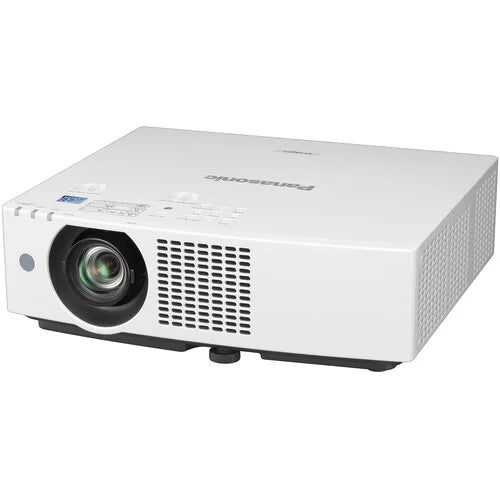
As configured for this product, the Panasonic PT-VMZ61 6200-Lumen WUXGA Laser 3LCD Projector in white uses a 6,200-lumen laser source designed for classrooms and conference spaces. Content remains clearly visible with lights on and blinds open, supported by native WUXGA 1920 x 1200 definition picture with a 3,000,000:1 contrast ratio, which produces vivid color, natural skin tones, vibrant whites, and deep blacks in PT-VMZ61. Getting your content projected is easy with the use of a mobile device via PC software and app, a USB flash drive, or via QR code over a wireless LAN. That projection can be easily adjusted and delivered onto angled surfaces, even corners, with 1.6x zoom, lens adjustment, and 6-point screen correction.
Daylight View Basic of PT-VMZ61: Guide
In PT-VMZ61 Daylight View Basic enhances picture sharpness by clarifying detail definition in dark areas of the picture, which can be difficult to see in bright light. A sensor measures the amount of ambient light in the room and optimizes halftone color and brightness for the best results according to surrounding levels of illumination.
Eco-Friendly Power Consumption
The PT-VMZ61 projector uses about 20% less energy than the previous series. Efficiency is further improved, and brightness is optimized to suit ambient light levels, just by pressing the ECO2 button on the remote control. Adopting energy-efficient Panasonic projection in your meeting rooms or learning spaces helps you to achieve CSR environmental policy objectives while reducing waste.
Easy Maintenance of PT-VMZ61: Guide
In typical office and classroom settings, the PT-VMZ61 projector's reusable ECO Filter doesn't need replacement until about 20,000 hours. That equates to about 10 years of service assuming about 40 hours of projection per working week. When earlier filter service is required, the element can be washed and reused twice. This cuts waste and spare-parts inventory while supporting organizational environmental targets.
Lens Shift in PT-VMZ61 and Zoom
PT-VMZ61 have Built-in 1.6x optical zoom (1.09 to 1.77:1) allows projection from close range or a distance, enhancing projector location flexibility and bringing large, easy-to-see pictures to rooms of distinct sizes and shapes. V/H Lens-Shift function supplies +44% to 0% vertical adjustment, useful whenever projecting from a high ceiling, and ±20% horizontal adjustment to correctly place the picture whenever projecting off-axis to the screen.
Digital focal range Extender in PT-VMZ61
One consideration whenever updating your school or business projectors is whether the replacement projector fits the existing mount positions on the ceiling. In some cases, the throw distance required to produce a picture at the desired size might exceed the projector's optical zoom range. Panasonic answers the problem with a new Digital Zoom Extender function. The unit supplies a convenient way to fit the picture to your screen beyond the optical zoom range, reducing the need to relocate your projector mounts and potentially saving you time, money, and hassle on your next refreshment cycle.
6-Point Screen Adjustment in PT-VMZ61: Guide
This projector incorporates a 6-point screen correction. It permits you to perform 4-corner and horizontal/vertical keystone correction via remote control to remove trapezoidal distortion whenever projecting from an angle, such as a high ceiling. An extra two control points located at the center top and bottom of the screen can be used to remove distortion whenever projecting a picture into the corner of a room.
Easy Operation: Dual CEC HDMI Inputs — PT-VMZ61
HDMI sources are compatible with control signals sent via a CEC command, giving you limited control over the projector through the compatible source device's remote control. The projector powers up from standby and commences playback automatically on command from a compatible player, such as an optional Wireless Presentation System PressIT, whenever connected to the projector via HDMI.
DIGITAL LINK and 4K Input Support with HDMI
This projector accepts 4K footage source signals via DIGITAL LINK and HDMI terminals. This is a big advantage whenever integrating the projectors into existing 4K-ready system infrastructure where 4K signals are distributed to a network of display endpoints with distinct screen resolutions without having to use an outboard converter or reencode the source.
Single-Cable DIGITAL LINK: Guide — PT-VMZ61
DIGITAL LINK is a single-cable AV and control option based on HDBaseT that allows 4K footage, audio, and control-signal transmission via a single Cat 5e STP cable (or higher) for distances of up to 164' or 492' for 1080p footage, reducing cabling cost and installation complexity whenever projectors are at a long distance from the server room.
Additional LAN Terminal for Dedicated operation — PT-VMZ61
You can control the projector via a dedicated LAN terminal or the HDBaseT-based DIGITAL LINK link. Both interfaces support 100Base-TX and 10Base-T compatible control signals via Panasonic, PJLink, Crestron Connected, AMX DD, and Extron device control and management uses.
Screen Adjustment Function: Guide — PT-VMZ61
Screen Adjustment fits the picture to the screen whenever projecting from an unusual angle. Curved Screen Correction removes barrel or pincushion distortion for projection onto curved surfaces.
Shutter Function: Guide — PT-VMZ61
Press a button on top of the unit or on the remote control to block light feed temporarily via the shutter function. This feature is useful whenever taking a short recess during lessons or meetings, or whenever you want to pause content without showing a picture, but keep the projector on and ready to go again instantly.
QR Code Wireless LAN Connection: Guide — PT-VMZ61
Mobile devices join the projector's wireless LAN by scanning an on-screen QR code with the phone camera; the optional AJ-WM50 wireless module is required. No password or SSID entry is required. Then use Panasonic's free Wireless Projector app to beam choose media stored on your device to the big screen. This feature saves time and prevents disruption to the flow of the class or meeting.
PressIT One-Press Wireless Solution: Guide — PT-VMZ61
Mirror your device's screen on the projector screen almost instantly; no software is needed. Wireless Presentation System PressIT can connect up to 32 devices to the projector wirelessly, and it enables people to display their screens and switch presenters with a single button press. PressIT comprises a CEC command-compatible HDMI receiver on the projector side and transmitters that connect to PCs or mobile devices. Just connect, press a button, and your device screen is displayed on the projector via the system's secure 5 GHz Wi-Fi 5 (802.11ac)-compatible wireless LAN. Get more value from face-to-face interactions and streamline communication without cable hassle at a safe social distance.
Power Chosen Devices via USB-DC Terminal
The projector incorporates a 5V/2A USB-DC terminal to power optional Wireless Presentation PressIT or a compatible HDMI media streaming device for a neat installation on the ceiling without the need for extra AC outlets.
Quiet Operation to Limit Distractions: Guide
Projector noise should remain unobtrusive whether a class or meeting is held in person, sent to remote participants by IP camera, or delivered in a hybrid format. The projector incorporates a Quiet Setting enabling operation with as little as 26 dB of noise, helping the projector to fit unobtrusively into the installation setting while keeping your group's attention focused.
No Light-Source or Filter Replacement for 20,000 Hours in PT-VMZ61: Guide
The projector additionally integrates Panasonic's SOLID SHINE Laser technology and long-life ECO Filter, which do not require replacement for 20,000 hours whenever used in a typical office or classroom setting. Maintenance expense and service visits are reduced because the washable Eco Filter can be reused twice, limiting the need to stock replacement consumables.
Multi Observation and Control Software with Optional Early Warning Functions
Panasonic's free AV management software for Windows PC lets you monitor and control up to 2048 compatible display devices of any brand via LAN to lower maintenance hassle inside display networks of any scale. The Multi-Monitoring and Control Software permits status observation, device control, content playlist delivery, playback scheduling, and system-map visualization. A free 90-day trial of optional Early Warning software is included. It notifies the operator in the event of a playback or device error and sends alerts whenever symptoms of trouble are detected.
Maintenance reminders help in the management of consumable parts inventories and the scheduling of maintenance, while operational reports can be generated and exported as a text file. The software links with compatible network cameras for live screen observation, and you can monitor devices from a distance from a tablet via VPN. Software data may be acquired via Web API and installed onto an existing control use. For more information, visit our software information webpage.
Simple Operation: Auto Signal Switching of PT-VMZ61
This projector makes life easy for faculty and staff, who use the projectors every day. Auto Input-Signal Search function detects the active source device, switches to the corresponding source, and enables playback to commence without the operator having to manually perform these operations.
Quick On/Quick Off and Direct Off
Whenever the projector is switched on, the startup screen is displayed almost instantly at full brightness, with no gradual fade-in you expect from a lamp projector. This helps to maintain the momentum of your lesson or meeting. And unlike lamp projectors, you can switch off the projector and unplug it without waiting for cooldown. Direct Power Off function enables the projector to be safely shut off via the room's breaker switch.
Plug-and-Play Display with Memory Viewer
You don't even need a computer to start presenting-just insert a USB memory device containing compatible still pictures to the projector's USB port, press the NETWORK/USB button on the remote, choose MEMORY VIEWER, and start presenting. Advance or go back to the previous slide through the arrow keys on the remote.
Additional capabilities — PT-VMZ61
- Supports Crestron Connected, Extron, AMX DD, and PJLink
- 10W speaker and microphone input
- Free 360° installation
- ECO Management System with 0.5W standby
- Presentation Support System
- Startup Logo function
- Emulation function
- Presenter Light software
- Audio Standby mode
- DICOM Simulation mode
buy it from
Key Features
- Brightness of 6200 Lumens
- WUXGA (1920 x 1200) Native Resolution
- 1.6x Zoom & 1.09:1 to 1.77:1 Throw Ratio
- 2 x HDMI with 4K Signal Input Support
- Analog Audio Input and Output
- Designed for 24/7 Operation
- HDBaseT & PJLink Compatible
- 10W Mono Speaker
Shop by Categories


Explore other brands


