


 SKU: BDLKULSTMP010G
Blackmagic Design Media Player 10G
Blackmagic Design Media Player 10G
In stock
View full details WhatsApp us for inquiries


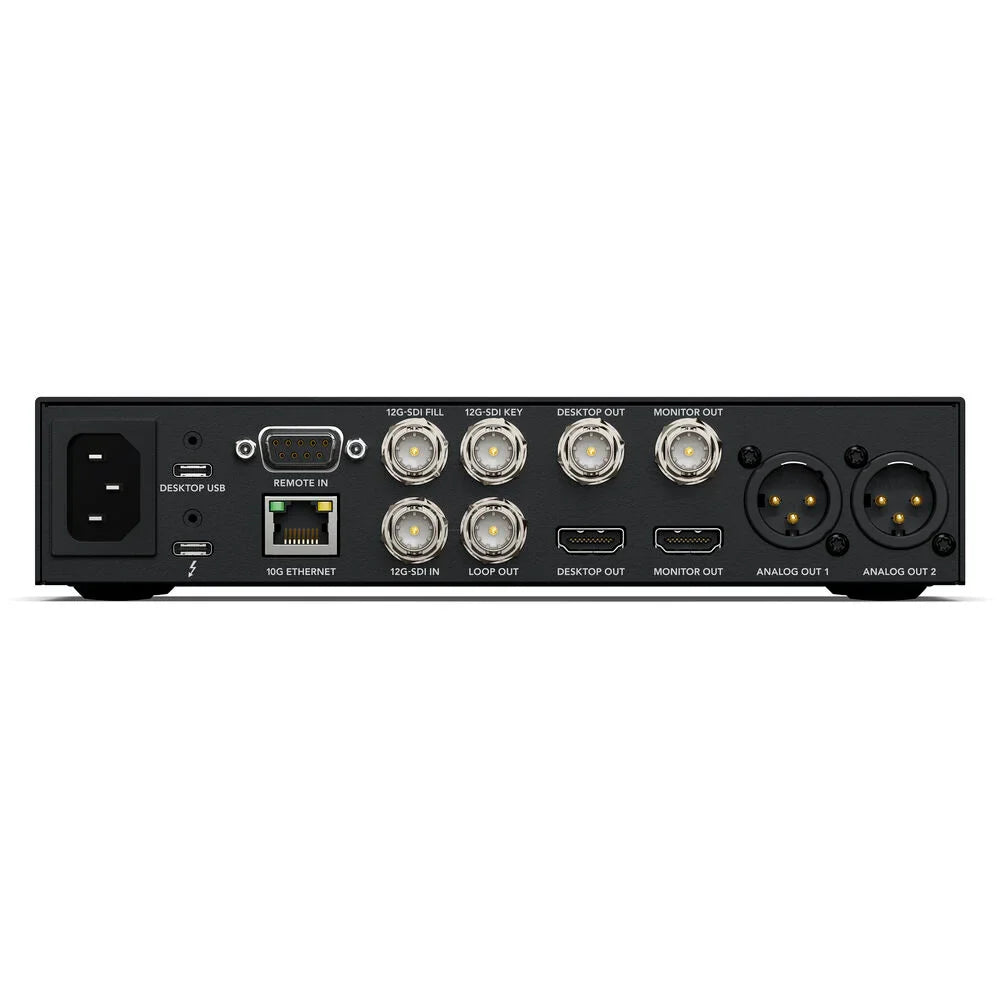
Considering the complete platform, Capture and reproduce broadcast footage on your Thunderbolt computer through the Blackmagic Media Player 10G. This media player provides swift links for seamless playback and editing of large, high-resolution files. With individual 12G-SDI feeds for playback, fill, and key components, along with 12G-SDI sources for capturing, and a rapid 10G Ethernet link to a computer for power (PoE) and media accessibility.

Blackmagic Media Player is tailored for Thunderbolt computers, delivering a broad capture and playback option ideal for live production switchers or extensive broadcast setups. Beyond footage input and feed functionalities, it provides 10G Ethernet interfacing and powers your computer. Dual 12G-SDI feeds support fill and key playback, complemented by 12G-SDI capture, and 10G Ethernet facilitates network storage access and laptop power via a single Thunderbolt link. Additionally, there's a separate Thunderbolt link on the front for hassle-free laptop interfacing. It fully allows Deck Link API features, maintaining seamless compatibility with most footage software.
The DaVinci Resolve 19 cut page introduces innovative media player, editing, and replay functions. It effortlessly handles common footage file formats, enabling playback of files provided by clients. For broadcast graphics, DaVinci Resolve 19 seamlessly plays footage files with an alpha channel, outputting them as 10-bit SDI fill and key signals. The new multi-source viewer simplifies media browsing, automatically displaying matching clips in a multiview format. New "on air" controls permit the key feed to activate the downstream keyer in a switcher, streamlining playout automation with a single button press. DaVinci Resolve can even incorporate automated stingers, making it an ideal option for news and replay operations.
 Blackmagic Media Player provides a diverse option for broadcast playback, whether placed on a desktop or rack-mounted through a Blackmagic Universal Rack Shelf. The front panel provides an LCD display delivering footage and audio meter status information, including source, footage standard, and the depth of the capture/playback frame buffer. The audio meter can be toggled between VU and PPM settings. Additionally, there's a headphone socket, speaker, and a speaker permit button. To activate the speaker, simply double press the speaker permit button. Whenever mounted in a control room, the front Thunderbolt link enables convenient link of your computer directly into the front of the rack.
Blackmagic Media Player boasts fast Thunderbolt interfacing for footage capture and playback, alongside 10G Ethernet and laptop power transmission via a single cable. Thunderbolt ports are provided on both the front and rear panels, facilitating link to either rack-mounted or laptop computers. Thunderbolt produces ample speed to handle large 4:4:4:4 and 4:2:2:4 files with alpha channels, across all SD, HD, and Ultra HD footage standards up to 2160p60. Leveraging the DeckLink API maintains compatibility with almost all footage software. Moreover, the bidirectional Thunderbolt link permits real-time footage capture, processing, and feed, effectively transforming computers into graphics processing engines.
The Blackmagic Media Player includes a plethora of links for observation, extending the desktop, and fast networking, all via a single Thunderbolt link. The program fill and key feeds can be muted to prevent footage from keying on a switcher until the replay begins. Meanwhile, the dedicated 12G-SDI and HDMI observation feeds remain active, allowing you to prepare for the next replay. Additionally, there's balanced audio out for powered speakers. Live source observation of the switcher multiview for replay is facilitated by the 12G-SDI footage in feature. Moreover, the 10G Ethernet offers fast access to shared storage for ISO footage files. An extended desktop is additionally provided for the DaVinci UI, along with USB expansion for a keyboard and mouse.
Equipped with dual 12G-SDI footage feeds, the Blackmagic Media Player can integrate seamlessly with live production switchers, enabling overlay of broadcast graphics with transparency. Internally, there's hardware support for both RGBA and YUVA frame buffers. With RGBA graphics, the Blackmagic Media Player automatically transcodes RGB pixels to 10-bit YUV on the fill feed and the alpha channel to the 10-bit key feed. These two SDI feeds are then connected to a live production switcher for keying over footage, preserving smooth blending of transparent elements in the pictures. This makes the Blackmagic Media Player ideal for broadcast graphics and stingers.
Utilizing the same Desktop Footage software found in popular DeckLink and UltraStudio capture and playback solutions, the Blackmagic Media Player accommodates simultaneous real-time bidirectional transfer of footage data to and from the computer, with extremely low latency. This function enables capturing picture data into the computer from the SDI source while simultaneously sending picture data from the computer to the SDI feeds. This opens up possibilities for creating innovative solutions where the computer acts as a processing engine. For example, you can use the computer as a keyer or generate broadcast graphics over the live source. Additionally, it supports exciting new AI-based processing overlaid on live footage.
 The inclusion of a high-speed 10G Ethernet port in the Blackmagic Media Player permits access to network storage whenever your computer is connected to the Thunderbolt port. This eliminates the need for extra Ethernet adapters, as both footage and network interfacing are provided via a single cable. With 10G Ethernet being ten times faster than regular Ethernet, you benefit from ample speed for handling numerous footage streams, which is especially useful for tasks like replay work. Moreover, the 10G Ethernet port boasts very low latency for swift access times. Additionally, Blackmagic Cloud Stores support 10G Ethernet, allowing for speedy access to shared media and ISO captures, facilitating collaboration among several editors working simultaneously in DaVinci Resolve.
The Blackmagic Media Player is engineered to uphold the highest standards of footage quality. It provides support for capture and playback to popular footage formats like Apple ProRes, DNxHD, or even 10-bit uncompressed, supporting versatility across distinct file formats. Utilizing 10-bit technology is integral, as it supports colors to be represented with four times the precision of 8-bit footage, making it a widely adopted television standard. Opting for 10-bit uncompressed footage ensures that all pictures are an exact pixel-for-pixel replica of the original source, guaranteeing the utmost quality in every aspect. This results in razor-sharp green screen keying, seamless VFX compositions, and superior color correction functions.
The Blackmagic Media Player provides seamless compatibility with a wide array of popular footage editing software, granting you the flexibility to utilize the tools you're already familiar with and fond of. It's particularly well-suited for broadcast editing and color correction tasks whenever paired with DaVinci Resolve. Because of its simultaneous capture and playback support, you can leverage DaVinci Resolve's live grading feature to capture footage, apply color correction, and feed the result concurrently. The Blackmagic Media Player also works alongside Final Cut Pro, Media Composer, Premiere Pro, and other editing applications, widening creative workflow choices. Additionally, you can craft stunning visual effects through Fusion, After Effects, and Photoshop.
 For creating broadcast graphics and titles, it's essential to employ familiar tools that graphic designers are accustomed to, helping ensure highest creativity without the need for retraining. The Blackmagic Media Player seamlessly interfaces with Fusion, the visual effects software built-in into DaVinci Resolve, as well as Adobe After Effects and Photoshop. Fusion Studio, in particular, stands out as a robust node-based compositing VFX tool, offering both 2D and 3D settings, a vast array of effects, and more. Additionally, Fusion can be accessed free of charge inside DaVinci Resolve. You can utilize the bundled Blackmagic Media Express software to capture and playback footage into files that can be imported into Fusion, After Effects, or Photoshop.
The Blackmagic Media Player allows the latest Ultra HD footage standards via its 12G-SDI footage links, making it an ideal option for broadcasters seeking to transition to Ultra HD and 4K processes. Furthermore, the player can be updated via software to accommodate new television standards in the future. Despite featuring 12G-SDI links, they are multi-rate and can handle lower definition SD for archival purposes or HD for broadcast footage applications. Additionally, whenever connected to 3G-SDI sources, you have the flexibility to switch between Level A and B.
Since its inception in the early 1980s, the RS-422 protocol has been the go-to control link for broadcast decks, originally developed by Sony and now widely adopted across broadcast hardware. The Blackmagic Media Player is equipped with a RS-422 deck control source link, enabling remote control of compatible software via broadcast automation systems. This link also handles extra commands for the Enhanced Media Protocol, facilitating the management of disk recorders.
For those interested in creating tailored solutions for the Blackmagic Media Player, the Blackmagic Desktop Footage SDK is provided for free download on macOS, Windows, and Linux platforms. This developer SDK simplifies the process of developing custom solutions for in-house use or for commercial sale to other broadcasters. Offering both low-level control of hardware for enhanced flexibility and high-level interfaces for common tasks, the Desktop Footage SDK caters to diverse development needs. With thousands of manufacturers and developers relying on Blackmagic DeckLink cards in their devices, the Desktop Footage SDK supplies a dependable foundation for crafting high-quality broadcast solutions.
Locate us: https://goo.gl/maps/YZQmjfG5vYQS3ZLU7
Utilize DaVinci Resolve for Blackmagic Media Player 10G: Guide

Blackmagic Media Player is tailored for Thunderbolt computers, delivering a broad capture and playback option ideal for live production switchers or extensive broadcast setups. Beyond footage input and feed functionalities, it provides 10G Ethernet interfacing and powers your computer. Dual 12G-SDI feeds support fill and key playback, complemented by 12G-SDI capture, and 10G Ethernet facilitates network storage access and laptop power via a single Thunderbolt link. Additionally, there's a separate Thunderbolt link on the front for hassle-free laptop interfacing. It fully allows Deck Link API features, maintaining seamless compatibility with most footage software.
News Editing: Guide
The DaVinci Resolve 19 cut page introduces innovative media player, editing, and replay functions. It effortlessly handles common footage file formats, enabling playback of files provided by clients. For broadcast graphics, DaVinci Resolve 19 seamlessly plays footage files with an alpha channel, outputting them as 10-bit SDI fill and key signals. The new multi-source viewer simplifies media browsing, automatically displaying matching clips in a multiview format. New "on air" controls permit the key feed to activate the downstream keyer in a switcher, streamlining playout automation with a single button press. DaVinci Resolve can even incorporate automated stingers, making it an ideal option for news and replay operations.
Broadcast construction of Blackmagic Media Player 10G
 Blackmagic Media Player provides a diverse option for broadcast playback, whether placed on a desktop or rack-mounted through a Blackmagic Universal Rack Shelf. The front panel provides an LCD display delivering footage and audio meter status information, including source, footage standard, and the depth of the capture/playback frame buffer. The audio meter can be toggled between VU and PPM settings. Additionally, there's a headphone socket, speaker, and a speaker permit button. To activate the speaker, simply double press the speaker permit button. Whenever mounted in a control room, the front Thunderbolt link enables convenient link of your computer directly into the front of the rack.
High-Speed Thunderbolt connections of Blackmagic Media Player 10G
Blackmagic Media Player boasts fast Thunderbolt interfacing for footage capture and playback, alongside 10G Ethernet and laptop power transmission via a single cable. Thunderbolt ports are provided on both the front and rear panels, facilitating link to either rack-mounted or laptop computers. Thunderbolt produces ample speed to handle large 4:4:4:4 and 4:2:2:4 files with alpha channels, across all SD, HD, and Ultra HD footage standards up to 2160p60. Leveraging the DeckLink API maintains compatibility with almost all footage software. Moreover, the bidirectional Thunderbolt link permits real-time footage capture, processing, and feed, effectively transforming computers into graphics processing engines.
Replay/Monitoring/Desktop Extension Connections: Guide
The Blackmagic Media Player includes a plethora of links for observation, extending the desktop, and fast networking, all via a single Thunderbolt link. The program fill and key feeds can be muted to prevent footage from keying on a switcher until the replay begins. Meanwhile, the dedicated 12G-SDI and HDMI observation feeds remain active, allowing you to prepare for the next replay. Additionally, there's balanced audio out for powered speakers. Live source observation of the switcher multiview for replay is facilitated by the 12G-SDI footage in feature. Moreover, the 10G Ethernet offers fast access to shared storage for ISO footage files. An extended desktop is additionally provided for the DaVinci UI, along with USB expansion for a keyboard and mouse.
Key Outputs and Independent Fill
Equipped with dual 12G-SDI footage feeds, the Blackmagic Media Player can integrate seamlessly with live production switchers, enabling overlay of broadcast graphics with transparency. Internally, there's hardware support for both RGBA and YUVA frame buffers. With RGBA graphics, the Blackmagic Media Player automatically transcodes RGB pixels to 10-bit YUV on the fill feed and the alpha channel to the 10-bit key feed. These two SDI feeds are then connected to a live production switcher for keying over footage, preserving smooth blending of transparent elements in the pictures. This makes the Blackmagic Media Player ideal for broadcast graphics and stingers.
Playback and Simultaneous Capture
Utilizing the same Desktop Footage software found in popular DeckLink and UltraStudio capture and playback solutions, the Blackmagic Media Player accommodates simultaneous real-time bidirectional transfer of footage data to and from the computer, with extremely low latency. This function enables capturing picture data into the computer from the SDI source while simultaneously sending picture data from the computer to the SDI feeds. This opens up possibilities for creating innovative solutions where the computer acts as a processing engine. For example, you can use the computer as a keyer or generate broadcast graphics over the live source. Additionally, it supports exciting new AI-based processing overlaid on live footage.
10G Ethernet port in Blackmagic Media Player 10G: Guide
 The inclusion of a high-speed 10G Ethernet port in the Blackmagic Media Player permits access to network storage whenever your computer is connected to the Thunderbolt port. This eliminates the need for extra Ethernet adapters, as both footage and network interfacing are provided via a single cable. With 10G Ethernet being ten times faster than regular Ethernet, you benefit from ample speed for handling numerous footage streams, which is especially useful for tasks like replay work. Moreover, the 10G Ethernet port boasts very low latency for swift access times. Additionally, Blackmagic Cloud Stores support 10G Ethernet, allowing for speedy access to shared media and ISO captures, facilitating collaboration among several editors working simultaneously in DaVinci Resolve.
10-Bit Broadcast video signal Quality of Blackmagic Media Player 10G
The Blackmagic Media Player is engineered to uphold the highest standards of footage quality. It provides support for capture and playback to popular footage formats like Apple ProRes, DNxHD, or even 10-bit uncompressed, supporting versatility across distinct file formats. Utilizing 10-bit technology is integral, as it supports colors to be represented with four times the precision of 8-bit footage, making it a widely adopted television standard. Opting for 10-bit uncompressed footage ensures that all pictures are an exact pixel-for-pixel replica of the original source, guaranteeing the utmost quality in every aspect. This results in razor-sharp green screen keying, seamless VFX compositions, and superior color correction functions.
Compatible: Popular Software
The Blackmagic Media Player provides seamless compatibility with a wide array of popular footage editing software, granting you the flexibility to utilize the tools you're already familiar with and fond of. It's particularly well-suited for broadcast editing and color correction tasks whenever paired with DaVinci Resolve. Because of its simultaneous capture and playback support, you can leverage DaVinci Resolve's live grading feature to capture footage, apply color correction, and feed the result concurrently. The Blackmagic Media Player also works alongside Final Cut Pro, Media Composer, Premiere Pro, and other editing applications, widening creative workflow choices. Additionally, you can craft stunning visual effects through Fusion, After Effects, and Photoshop.
Blackmagic Media Player 10G interfaces: Tools for Broadcast Graphics
 For creating broadcast graphics and titles, it's essential to employ familiar tools that graphic designers are accustomed to, helping ensure highest creativity without the need for retraining. The Blackmagic Media Player seamlessly interfaces with Fusion, the visual effects software built-in into DaVinci Resolve, as well as Adobe After Effects and Photoshop. Fusion Studio, in particular, stands out as a robust node-based compositing VFX tool, offering both 2D and 3D settings, a vast array of effects, and more. Additionally, Fusion can be accessed free of charge inside DaVinci Resolve. You can utilize the bundled Blackmagic Media Express software to capture and playback footage into files that can be imported into Fusion, After Effects, or Photoshop.
Formats and Support for Various Resolutions
The Blackmagic Media Player allows the latest Ultra HD footage standards via its 12G-SDI footage links, making it an ideal option for broadcasters seeking to transition to Ultra HD and 4K processes. Furthermore, the player can be updated via software to accommodate new television standards in the future. Despite featuring 12G-SDI links, they are multi-rate and can handle lower definition SD for archival purposes or HD for broadcast footage applications. Additionally, whenever connected to 3G-SDI sources, you have the flexibility to switch between Level A and B.
RS-422 for Broadcast Automation operation
Since its inception in the early 1980s, the RS-422 protocol has been the go-to control link for broadcast decks, originally developed by Sony and now widely adopted across broadcast hardware. The Blackmagic Media Player is equipped with a RS-422 deck control source link, enabling remote control of compatible software via broadcast automation systems. This link also handles extra commands for the Enhanced Media Protocol, facilitating the management of disk recorders.
Custom SDK Solutions: Guide
For those interested in creating tailored solutions for the Blackmagic Media Player, the Blackmagic Desktop Footage SDK is provided for free download on macOS, Windows, and Linux platforms. This developer SDK simplifies the process of developing custom solutions for in-house use or for commercial sale to other broadcasters. Offering both low-level control of hardware for enhanced flexibility and high-level interfaces for common tasks, the Desktop Footage SDK caters to diverse development needs. With thousands of manufacturers and developers relying on Blackmagic DeckLink cards in their devices, the Desktop Footage SDK supplies a dependable foundation for crafting high-quality broadcast solutions.
Locate us: https://goo.gl/maps/YZQmjfG5vYQS3ZLU7
Key Features
- Playback and Capture for Thunderbolt
- Dual 12G-SDI Fill/Key Playback Outputs
- 12G-SDI Capture Input, 12G-SDI Loop Out
- 10G Ethernet Storage/Power to Computer
- Supports DeckLink API Features
Shop by Categories


Explore other brands


