

 SKU: HYPERD/ST/DG4P
Blackmagic Design HyperDeck Studio 4K Pro
Blackmagic Design HyperDeck Studio 4K Pro
In stock
View full details WhatsApp us for inquiries
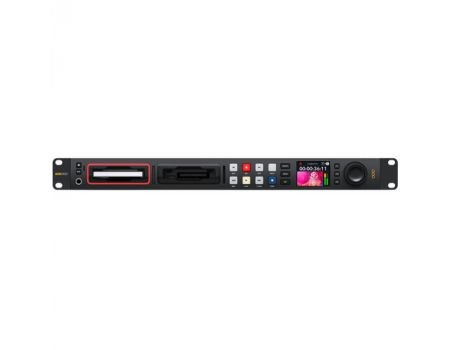
At the center of the specification, the Blackmagic Design HyperDeck Studio 4K Pro is a revised 1 RU file-based deck that provides the same operation and control of professional tape decks in an electronic configuration. This version updates the previous HyperDeck Studio versions with several features including 12G-SDI compatibility, two added SD medium slots, USB Type-C capture output, timecode source and feed, Ref source and feed, a redesigned jog/shuttle wheel, 10G Ethernet, and a speaker on the front.
The Studio 4K Pro records uncompressed footage with 10-bit 4:2:2 color through either ProRes or DNxHD codecs, as well as the H.264 and H.265 encoding formats. With two SSD ports and two SD medium slots, you can capture almost endlessly as one SSD becomes full, capture automatically keeps on to the other, and the SD medium slots are additionally hot-swappable. The Studio 4K Pro contains one 12G-SDI source, two 12G-SDI feeds, a loop-through 12G-SDI feed, a dedicated SDI monitor feed, and there's additionally one HDMI source and one HDMI feed that can all feed up to DCI 4K. The 4K Pro can even play ProRes 4444 files in true UHD for fill and principal feeds. The ports autodetect the feed and will refine to the SD, HD, 6G-SDI, or 12G-SDI configuration source. The 3-pin XLR timecode source and feed enable you to sync timecode with other devices, and it additionally enables you to daisy-chain with other devices to produce a timecode sync chain.
The Studio 4K Pro is a 1 RU rack-mountable device, with built-in rack mount ears. It integrates illuminated front interface control and a heavy jog/shuttle wheel for analog scrubbing. RS-422 control is supported for outboard control through the Ref source and output ports. The USB Type-C port permits you to capture to outboard disks, and you can additionally use it to plug into a PC to use as a source for a web stream. A built-in LCD on the front panel enables you to monitor the footage and screen timecode and transport details.
The new HyperDeck Studio recorders deliver been totally redesigned with dozens of new integrates. The enhanced versions have new broadcast-style front interface controls and more links on the rear interface. The LCD screen accommodates both light and dark settings, plus the transport control keys are stronger with a firm professional feel. The Pro versions function a weighted, precision-machined search dial whose cushioned rubber finish sits comfortably beneath the touchscreen. Plus the search dial contains an active clutch, only like a conventional broadcast dec. With dual media ports, you can change cards eliminating interrupting capture. The enhanced models even incorporate a front headphone link and speaker.
All versions capture to H.264, ProRes, and DNx files, so are well suited to capture broadcast masters, plus the 4K version adds H.265 whenever capture to UHD files. You can even use PCM or AAC audio. You get everything needed to transmit shows to broadcast teams and for uploading to YouTube.
All versions function timecode and reference generators, with feeds to loop to other HyperDecks. This means you can build a rack of HyperDeck studios for ISO camera capture, allowing multi-cam editing after live productions. You can even sync bodies to the SDI feed and the SDI source has shot sync.
HyperDeck Studio is well suited to digital signage as all versions have HDMI feed for connecting to large display TVs and projectors. The built-in sync generator lets you bring together several HyperDecks for large multiscreen footage walls. There's even FTP for file upload and a protocol for off-site control.
HyperDeck Studio handles all SD and HD standards so it's excellent for archiving old television shows from broadcast decks such as Electronic Betacam, Betacam SP, 1", U-matic, and VHS. You can even capture directly to H.264 to maximize capacity. For analog decks, only attach a Mini Converter Analog to SDI.
HyperDeck Studio provides traditional deck-style transport controls, such as a search dial for jog, shuttle, and scroll. The space-efficient LCD shows timecode and transport details, plus a full-color thumbnail preview of the current mount in capture or playback. It additionally displays information about each card's capture status, along with signal format, shot rate details, and audio levels, all on the identical display. The LCD incorporates monitoring for footage, plus audio level meters, selectable between technically accurate VU or PPM ballistics. The combination of familiar VTR style settings with the built-in LCD display makes HyperDeck Studio incredibly fast to use and very simple to learn.
HyperDeck Studio incorporates a conventional broadcast-style control interface that's very fast to use. Simply push the capture button and you instantly start capture the footage source to a file. You can additionally change the capture file configuration from the menu. There are transport control keys for playback, rewind, fast ahead, previous mount, next mount, and more. The Pro versions deliver a machined metal search dial that accommodates shuttle, jog, and scroll so you can locate clips fast. Any control pressed on the front interface is sent to the rear RS-422 off-site feed for looping control to several HyperDecks. The Plus and Pro versions also incorporate a front interface speaker and headphone socket for live audio observation.
All HyperDeck Studio versions support capture to common SD cards and UHS-II cards so you don't need expensive custom media. However, the Pro versions additionally add two SSD ports so you can use two distinct kinds of media. SD cards and SSDs are the strong choices for broadcast media since they are small and very affordable. when through H.264, the files are so incredibly small you get very long captures even on more compact low-cost cards. Plus, you can even capture to outboard USB disks. With H.265, you can capture up to 58 hour period in 2160p60 Ultra HD or up to 157 hour period of H.264 capture in 1080p59.94 on a 1TB medium. That's over 6 days of capture in HD through a one 1TB card.
All HyperDeck Studio versions feature dual media ports for nonstop capture. When the capture card becomes full, capture automatically keeps onto the next medium. That's perfect whenever capture long live events since you can "hot swap" a full medium for an empty medium while capture continues in the other slot. Every slot has a status indicator to show which medium is being employed, either red for capture or green for playback. Plus all versions now feature very long file captures to a one file for simple file spread. HyperDeck Studio is readily repairable with each card slot through an individual PCB assembly that can be replaced if it ever becomes worn output from heavy use.
If capture to other kinds of media is needed, the USB Type-C scaling port lets you plug in an outboard flash disk for capture. USB Type-C flash disks deliver unlimited capacity since they can be physically broader than a SD medium or SSD. An editing disk array can serve as the capture destination, so footage is ready for post without an intermediate transfer. Connect the disk to the workstation to start editing. You can even attach a Blackmagic MultiDock 10G that has 4 standalone SSD media ports, so you can attach compatibility with SSD media to the HyperDeck Studio Mini and Plus versions. There are additionally menus for managing outboard disks on the built-in LCD.
HyperDeck accommodates the primary widely chosen codecs in use today. All versions incorporate DNx and ProRes file formats. However, all versions also incorporate H.264 in fidelity levels up to full 10 bit 4:2:2 whenever capture in NTSC, PAL, 720p, 1080p, and true 1080i interlaced formats. Whereas the 4K version adds H.265 whenever capture in Ultra HD. That means you get tight 60:1 to 285:1 encoding ratios for very small files at full broadcast fidelity. Plus you can choose uncompressed PCM audio, or even AAC audio whenever uploading files to YouTube. All versions compatibility both ExFAT and HFS+ disk formats and long-duration one file captures. The Plus and Pro versions even compatibility ProRes 4444 enabling fill and principal playback.
Depending on the version HyperDeck Studio features a broad variety of footage and audio links such as 3G-SDI, 6G-SDI, or 12G-SDI. All versions incorporate HDMI for connecting to televisions and projectors. There's even a purpose-built SDI observation feed on the Pro and Plus versions with on-screen status. The Pro and Plus versions include two SDI feeds so you can play ProRes 4444 files, enabling simultaneous fill and key feed for keying in live workflow switchers. The onboard timecode and reference generator links can be looped to sync several units for ISO capture. The 4K version has 10G Ethernet for extremely fast installation file copying. All versions even incorporate AC and locking DC power.
With multi-rate SDI, you get compatibility for the most popular footage standards. The SDI and HDMI links will automatically switch footage standards, so accommodate SD, HD, and Ultra HD formats depending on the version. SD formats incorporate NTSC and PAL. 720p HD standards incorporate 720p50 and 720p59.94p. 1080i HD interlaced formats incorporate 1080i50 and 1080i59.94. 1080p HD formats incorporate 1080p23.98, 24, 25, 29.97, 30, 50, 59.94, and 60p. HyperDeck can even compatibility 1080 PsF formats. On the 4K version, Ultra HD formats up to 2160p60 are supported. Plus the 4K version accommodates 2K and 4K DCI rates up to 30p. HyperDeck Studio additionally accommodates level A and level B whenever running HD footage at 3G-SDI rates.
The HyperDeck Studio Plus and Pro versions can play ProRes 4444 HD files to the two standalone SDI fill and key feeds. That means you can use HyperDeck Studio as a graphics mount player for broadcast animation since the ProRes 4444 file's alpha channel will be without manual intervention converted to the key SDI feed for real-time keying in a live workflow switcher. Plus the HyperDeck Studio 4K Pro version adds fill and principal playback in UHD. Imagine running animated lower third titles and stingers with principal channel feeds for incredibly clean multilayered titles. Plus, switchers such as Blackmagic Configuration ATEM versions connect to HyperDeck Studio through Ethernet to trigger playback synced to transitions.
For compatibility with numerous computer software, HyperDeck Studio provides webcam support through the USB link. If you're not capture to an outboard USB disk, you can plug the HyperDeck USB link directly into a PC to get live footage into any footage software. The PC is tricked into thinking the HyperDeck is a common webcam, but it's really a broadcast-quality footage source. That guarantees full compatibility with any footage software and in full definition 1080 HD fidelity. HyperDeck Studio's USB webcam function works with any footage software comprising zoom, Microsoft Teams, and Skype, or get live broadcasting with Open Broadcaster, XSplit Broadcaster, and additional.
You'll be prepared for the latest feature film processes with support for enhanced HDR standards. All HDR status details is embedded into the SDI links so downstream hardware can detect whenever HDR files are played. When capture, the SDI and HDMI sources will additionally automatically detect HDR footage standards and then tag the files with the correct HDR details. Stationary metadata PQ and HLG formats are handled matched to the ST2084 conventional. Plus the front interface LCD has a wider colour gamut for both Rec. 2020 and Rec. 709 colour spaces. HyperDeck Studio Plus and Pro versions even enable you to load a 3D LUT into the observation feed to attach looks or to convert cinematic to footage gamma.
HyperDeck Studio incorporates professional multi-channel SDI audio for capture up to 16 channels. When capture from the SDI source, you can choose in the menu to capture 2, 4, 8, or 16 channels of audio in real time. There's extra room on the SDI observation status overlay, which enables the audio meter screen to show the quantity of channels you deliver enabled all at the identical time, and the audio meters will show 2, 4, 8, or 16 channels simultaneously. The audio meters are developed to use the correct ballistics, and you can change between distinct VU and PPM meter displays in the LCD menu. HyperDeck Studio is more than just a footage recorder, as it additionally has quality sound.
All HyperDeck versions enable media files to be uploaded from a distance, through simple FTP client applications. With 10G Ethernet constructed into the HyperDeck Studio 4K Pro version, file transfers are so fast, they are faster than the SD medium or SSD media disks. For off-site deck control, all versions use an easy-to-learn text-based protocol, so you can use a simple terminal application such as Telnet to test control commands. Simply log into the HyperDeck and then type "play" or "capture" and it will execute the command. If you bring together the control protocol and file transfers with a HyperDeck linked to a large USB Type-C disk array, you get a fantastic broadcast server for ingest, media handling, and play output.
The most popular control link employed on broadcast decks since the early 1980s is the RS-422 protocol. Originally developed by Sony, RS-422 is employed on almost all broadcast equipment. HyperDeck Studio incorporates wide protocol compatibility so you can connect it straight to broadcast systems. It additionally allows extra commands for the Enhanced Media Protocol for managing disk recorders. Whenever designing RS-422 control solutions, you'll know you're linked to a HyperDeck Studio whenever you see the ID 0xF0E0 in 30/60p, 0xF1E0 in 25/50p or 0xF2E0 in 24p. The full location of compatibility remote commands are supplied in the instruction manual and you can install this from the compatibility page of our website.
With a timecode and sync generator constructed into all versions, you can stack several units for electronic signage or multi-channel capture. Each HyperDeck has dedicated feeds for reference and timecode, immediate from the onboard sync and timecode generators. The generators "no-cost run" unless reference or timecode is linked to the sources, and then generators will lock automatically. This means you can loop from HyperDeck to HyperDeck to produce perfectly timed array or recorders.
The novel Blackmagic OS has been developed for high-performance film and broadcast devices and it manages all controls on HyperDeck Studio. Only Blackmagic OS supplies instant power on while such as powerful attributes such as LCD with footage, timecode and audio metering, observation with overlays, menus, fast networking, multi-disk media handling, 3D LUTs plus localization. The on-screen LCD menus incorporate settings to configure your HyperDeck Studio, plus the menus currently support both light and dark setting. Blackmagic OS provides world-leading installation performance and HyperDeck Studio 4K Pro can sustain files transfers at a massive 1.2 gigabytes per second on the unit's 10G Ethernet link.
HyperDeck Studio allows several languages so you don't need to learn a new language only to use it. You get compatibility for English, Chinese, Japanese, Korean, Spanish, German, French, Russian, Italian, Portuguese, Turkish, Polish, and Ukrainian languages. Whenever initially energized on for the first time, HyperDeck Studio will screen an initial language selector; the LCD interface also lets operators switch languages later from the next stage. Once a language is chosen, the LCD menus will change, plus the overlays on the SDI observation output will additionally change to the chosen language. All this means HyperDeck Studio is well suited to doing operate anywhere in the world.
Use All Footage Software and Broadcasting Sites
HyperDeck Studio records files that are compatible with virtually all post-production applications. Plus if you capture in H.264, you can upload files from HyperDeck Studio direct to broadcasting services such as YouTube, Facebook, Vimeo, Twitter, and additional. You can use widely chosen editing applications such as DaVinci Resolve, Apple Final Cut Pro, Adobe Premiere Pro, or Avid Media Composer since HyperDeck uses the identical file formats employed in post-production. Even VFX applications such as Fusion and Adobe After Effects operate with the files. Since HyperDeck records to disks formatted on computers, you can simply fitting the disk on any PC and start editing eliminating needing to transcode or convert the files.
Built-In Redundancy Holds You on Air
Serious broadcast teams need redundancy since it increases reliability. HyperDeck Studio incorporates redundant integrates to help maintain you stay on air. With dual media ports on all versions, and the Pro versions having 4 media ports, you can stay on air, even if one of the ports becomes damaged. Plus with the HyperDeck Studio HD Mini version you get 3 totally separate recorders in a one rack device, while the HyperDeck Studio HD Plus version permits 2 independent recorders in a one rack unit. All HyperDeck versions incorporate both AC and a locking DC power link, so you use the DC link with an outboard battery pack for redundant power.
Developed for Both Portable or Rack mount Use
Whenever you need a portable broadcast option, the HyperDeck Studio HD Mini version includes most provides miniaturized into an elegant 5" wide space-efficient configuration that's only one-third of a rack device wide. That means you can integrate three recorders in a one rack device. Only use the optional Teranex Mini Rack Shelf and you can fitting the three units side by side, then bolt it into a conventional hardware rack. Or you can bring together HyperDeck Studio Mini with other modules, such as a Teranex Mini Analog to 12G-SDI to convert the source from analog to SDI, all in the identical rack which is well suited to archive operate. HyperDeck Studio HD Mini looks great whenever it's not rack-mounted and simply employed by itself on a desktop.
Compatible with Switchers, Disk Docks, and Bodies
There's a broad variety of Blackmagic Design devices you can use with HyperDeck such as switchers, bodies, and broadcasting solutions. As the Mini and Plus versions don't incorporate SSD ports, you can attach a Blackmagic MultiDock 10G to use regular SSDs, enabling compatibility with media from other HyperDeck versions. HyperDeck Studio will manage all the disks for you and without manual intervention capture to disks in the MultiDock. You can even use the MultiDock with the HyperDeck Studio Pro versions just to attach extra SSDs for longer capture times. HyperDeck Studio is additionally a perfect mastering recorder whenever used with ATEM switchers, a mount player with fill and principal, or looped on switcher sources for ISO capture.
buy from
buy from
The Studio 4K Pro records uncompressed footage with 10-bit 4:2:2 color through either ProRes or DNxHD codecs, as well as the H.264 and H.265 encoding formats. With two SSD ports and two SD medium slots, you can capture almost endlessly as one SSD becomes full, capture automatically keeps on to the other, and the SD medium slots are additionally hot-swappable. The Studio 4K Pro contains one 12G-SDI source, two 12G-SDI feeds, a loop-through 12G-SDI feed, a dedicated SDI monitor feed, and there's additionally one HDMI source and one HDMI feed that can all feed up to DCI 4K. The 4K Pro can even play ProRes 4444 files in true UHD for fill and principal feeds. The ports autodetect the feed and will refine to the SD, HD, 6G-SDI, or 12G-SDI configuration source. The 3-pin XLR timecode source and feed enable you to sync timecode with other devices, and it additionally enables you to daisy-chain with other devices to produce a timecode sync chain.
The Studio 4K Pro is a 1 RU rack-mountable device, with built-in rack mount ears. It integrates illuminated front interface control and a heavy jog/shuttle wheel for analog scrubbing. RS-422 control is supported for outboard control through the Ref source and output ports. The USB Type-C port permits you to capture to outboard disks, and you can additionally use it to plug into a PC to use as a source for a web stream. A built-in LCD on the front panel enables you to monitor the footage and screen timecode and transport details.
production Broadcast Deck — Blackmagic Design HyperDeck
The new HyperDeck Studio recorders deliver been totally redesigned with dozens of new integrates. The enhanced versions have new broadcast-style front interface controls and more links on the rear interface. The LCD screen accommodates both light and dark settings, plus the transport control keys are stronger with a firm professional feel. The Pro versions function a weighted, precision-machined search dial whose cushioned rubber finish sits comfortably beneath the touchscreen. Plus the search dial contains an active clutch, only like a conventional broadcast dec. With dual media ports, you can change cards eliminating interrupting capture. The enhanced models even incorporate a front headphone link and speaker.
Mastering Recorder: Guide — Blackmagic Design HyperDeck
All versions capture to H.264, ProRes, and DNx files, so are well suited to capture broadcast masters, plus the 4K version adds H.265 whenever capture to UHD files. You can even use PCM or AAC audio. You get everything needed to transmit shows to broadcast teams and for uploading to YouTube.
ISO recording production flow — Blackmagic Design HyperDeck
All versions function timecode and reference generators, with feeds to loop to other HyperDecks. This means you can build a rack of HyperDeck studios for ISO camera capture, allowing multi-cam editing after live productions. You can even sync bodies to the SDI feed and the SDI source has shot sync.
Digital Signage: Guide — Blackmagic Design HyperDeck
HyperDeck Studio is well suited to digital signage as all versions have HDMI feed for connecting to large display TVs and projectors. The built-in sync generator lets you bring together several HyperDecks for large multiscreen footage walls. There's even FTP for file upload and a protocol for off-site control.
Broadcast Archive: Guide — Blackmagic Design HyperDeck
HyperDeck Studio handles all SD and HD standards so it's excellent for archiving old television shows from broadcast decks such as Electronic Betacam, Betacam SP, 1", U-matic, and VHS. You can even capture directly to H.264 to maximize capacity. For analog decks, only attach a Mini Converter Analog to SDI.
HyperDeck Studio 4K Pro Bright Color LCD Status Display: Guide
HyperDeck Studio provides traditional deck-style transport controls, such as a search dial for jog, shuttle, and scroll. The space-efficient LCD shows timecode and transport details, plus a full-color thumbnail preview of the current mount in capture or playback. It additionally displays information about each card's capture status, along with signal format, shot rate details, and audio levels, all on the identical display. The LCD incorporates monitoring for footage, plus audio level meters, selectable between technically accurate VU or PPM ballistics. The combination of familiar VTR style settings with the built-in LCD display makes HyperDeck Studio incredibly fast to use and very simple to learn.
HyperDeck Studio 4K Pro Traditional Broadcast Deck operation
HyperDeck Studio incorporates a conventional broadcast-style control interface that's very fast to use. Simply push the capture button and you instantly start capture the footage source to a file. You can additionally change the capture file configuration from the menu. There are transport control keys for playback, rewind, fast ahead, previous mount, next mount, and more. The Pro versions deliver a machined metal search dial that accommodates shuttle, jog, and scroll so you can locate clips fast. Any control pressed on the front interface is sent to the rear RS-422 off-site feed for looping control to several HyperDecks. The Plus and Pro versions also incorporate a front interface speaker and headphone socket for live audio observation.
Supports SD Cards, UHS-II Cards or SSDs: Guide — Blackmagic Design HyperDeck
All HyperDeck Studio versions support capture to common SD cards and UHS-II cards so you don't need expensive custom media. However, the Pro versions additionally add two SSD ports so you can use two distinct kinds of media. SD cards and SSDs are the strong choices for broadcast media since they are small and very affordable. when through H.264, the files are so incredibly small you get very long captures even on more compact low-cost cards. Plus, you can even capture to outboard USB disks. With H.265, you can capture up to 58 hour period in 2160p60 Ultra HD or up to 157 hour period of H.264 capture in 1080p59.94 on a 1TB medium. That's over 6 days of capture in HD through a one 1TB card.
Dual Media Slots for Non-Stop recording production flow
All HyperDeck Studio versions feature dual media ports for nonstop capture. When the capture card becomes full, capture automatically keeps onto the next medium. That's perfect whenever capture long live events since you can "hot swap" a full medium for an empty medium while capture continues in the other slot. Every slot has a status indicator to show which medium is being employed, either red for capture or green for playback. Plus all versions now feature very long file captures to a one file for simple file spread. HyperDeck Studio is readily repairable with each card slot through an individual PCB assembly that can be replaced if it ever becomes worn output from heavy use.
HyperDeck Studio 4K Pro Record to External USB Type-C Media Disks: Guide
If capture to other kinds of media is needed, the USB Type-C scaling port lets you plug in an outboard flash disk for capture. USB Type-C flash disks deliver unlimited capacity since they can be physically broader than a SD medium or SSD. An editing disk array can serve as the capture destination, so footage is ready for post without an intermediate transfer. Connect the disk to the workstation to start editing. You can even attach a Blackmagic MultiDock 10G that has 4 standalone SSD media ports, so you can attach compatibility with SSD media to the HyperDeck Studio Mini and Plus versions. There are additionally menus for managing outboard disks on the built-in LCD.
Practical Notes: H.265 Files and Popular ProRes, DNx, H.264,
HyperDeck accommodates the primary widely chosen codecs in use today. All versions incorporate DNx and ProRes file formats. However, all versions also incorporate H.264 in fidelity levels up to full 10 bit 4:2:2 whenever capture in NTSC, PAL, 720p, 1080p, and true 1080i interlaced formats. Whereas the 4K version adds H.265 whenever capture in Ultra HD. That means you get tight 60:1 to 285:1 encoding ratios for very small files at full broadcast fidelity. Plus you can choose uncompressed PCM audio, or even AAC audio whenever uploading files to YouTube. All versions compatibility both ExFAT and HFS+ disk formats and long-duration one file captures. The Plus and Pro versions even compatibility ProRes 4444 enabling fill and principal playback.
HyperDeck Studio 4K Pro enhanced Broadcast Connections
Depending on the version HyperDeck Studio features a broad variety of footage and audio links such as 3G-SDI, 6G-SDI, or 12G-SDI. All versions incorporate HDMI for connecting to televisions and projectors. There's even a purpose-built SDI observation feed on the Pro and Plus versions with on-screen status. The Pro and Plus versions include two SDI feeds so you can play ProRes 4444 files, enabling simultaneous fill and key feed for keying in live workflow switchers. The onboard timecode and reference generator links can be looped to sync several units for ISO capture. The 4K version has 10G Ethernet for extremely fast installation file copying. All versions even incorporate AC and locking DC power.
Choose 3G-SDI, 6G-SDI, or 12G-SDI Models: Guide — Blackmagic Design HyperDeck
With multi-rate SDI, you get compatibility for the most popular footage standards. The SDI and HDMI links will automatically switch footage standards, so accommodate SD, HD, and Ultra HD formats depending on the version. SD formats incorporate NTSC and PAL. 720p HD standards incorporate 720p50 and 720p59.94p. 1080i HD interlaced formats incorporate 1080i50 and 1080i59.94. 1080p HD formats incorporate 1080p23.98, 24, 25, 29.97, 30, 50, 59.94, and 60p. HyperDeck can even compatibility 1080 PsF formats. On the 4K version, Ultra HD formats up to 2160p60 are supported. Plus the 4K version accommodates 2K and 4K DCI rates up to 30p. HyperDeck Studio additionally accommodates level A and level B whenever running HD footage at 3G-SDI rates.
Key signal feeds for Broadcast Animations and Fill — Blackmagic Design HyperDeck
The HyperDeck Studio Plus and Pro versions can play ProRes 4444 HD files to the two standalone SDI fill and key feeds. That means you can use HyperDeck Studio as a graphics mount player for broadcast animation since the ProRes 4444 file's alpha channel will be without manual intervention converted to the key SDI feed for real-time keying in a live workflow switcher. Plus the HyperDeck Studio 4K Pro version adds fill and principal playback in UHD. Imagine running animated lower third titles and stingers with principal channel feeds for incredibly clean multilayered titles. Plus, switchers such as Blackmagic Configuration ATEM versions connect to HyperDeck Studio through Ethernet to trigger playback synced to transitions.
HyperDeck Studio 4K Pro USB Webcam signal feed for video signal Software
For compatibility with numerous computer software, HyperDeck Studio provides webcam support through the USB link. If you're not capture to an outboard USB disk, you can plug the HyperDeck USB link directly into a PC to get live footage into any footage software. The PC is tricked into thinking the HyperDeck is a common webcam, but it's really a broadcast-quality footage source. That guarantees full compatibility with any footage software and in full definition 1080 HD fidelity. HyperDeck Studio's USB webcam function works with any footage software comprising zoom, Microsoft Teams, and Skype, or get live broadcasting with Open Broadcaster, XSplit Broadcaster, and additional.
Monitoring 3D LUTs and HyperDeck Studio 4K Pro enhanced HDR Support
You'll be prepared for the latest feature film processes with support for enhanced HDR standards. All HDR status details is embedded into the SDI links so downstream hardware can detect whenever HDR files are played. When capture, the SDI and HDMI sources will additionally automatically detect HDR footage standards and then tag the files with the correct HDR details. Stationary metadata PQ and HLG formats are handled matched to the ST2084 conventional. Plus the front interface LCD has a wider colour gamut for both Rec. 2020 and Rec. 709 colour spaces. HyperDeck Studio Plus and Pro versions even enable you to load a 3D LUT into the observation feed to attach looks or to convert cinematic to footage gamma.
HyperDeck Studio 4K Pro Includes production Multi-Channel SDI sound
HyperDeck Studio incorporates professional multi-channel SDI audio for capture up to 16 channels. When capture from the SDI source, you can choose in the menu to capture 2, 4, 8, or 16 channels of audio in real time. There's extra room on the SDI observation status overlay, which enables the audio meter screen to show the quantity of channels you deliver enabled all at the identical time, and the audio meters will show 2, 4, 8, or 16 channels simultaneously. The audio meters are developed to use the correct ballistics, and you can change between distinct VU and PPM meter displays in the LCD menu. HyperDeck Studio is more than just a footage recorder, as it additionally has quality sound.
HyperDeck Studio 4K Pro Incredibly Fast Network File Transfers: Guide
All HyperDeck versions enable media files to be uploaded from a distance, through simple FTP client applications. With 10G Ethernet constructed into the HyperDeck Studio 4K Pro version, file transfers are so fast, they are faster than the SD medium or SSD media disks. For off-site deck control, all versions use an easy-to-learn text-based protocol, so you can use a simple terminal application such as Telnet to test control commands. Simply log into the HyperDeck and then type "play" or "capture" and it will execute the command. If you bring together the control protocol and file transfers with a HyperDeck linked to a large USB Type-C disk array, you get a fantastic broadcast server for ingest, media handling, and play output.
Traditional RS-422 Broadcast Deck operation — Blackmagic Design HyperDeck
The most popular control link employed on broadcast decks since the early 1980s is the RS-422 protocol. Originally developed by Sony, RS-422 is employed on almost all broadcast equipment. HyperDeck Studio incorporates wide protocol compatibility so you can connect it straight to broadcast systems. It additionally allows extra commands for the Enhanced Media Protocol for managing disk recorders. Whenever designing RS-422 control solutions, you'll know you're linked to a HyperDeck Studio whenever you see the ID 0xF0E0 in 30/60p, 0xF1E0 in 25/50p or 0xF2E0 in 24p. The full location of compatibility remote commands are supplied in the instruction manual and you can install this from the compatibility page of our website.
Practical Notes: Sync Generators and HyperDeck Studio 4K Pro Built-In Timecode
With a timecode and sync generator constructed into all versions, you can stack several units for electronic signage or multi-channel capture. Each HyperDeck has dedicated feeds for reference and timecode, immediate from the onboard sync and timecode generators. The generators "no-cost run" unless reference or timecode is linked to the sources, and then generators will lock automatically. This means you can loop from HyperDeck to HyperDeck to produce perfectly timed array or recorders.
HyperDeck Studio 4K Pro Blackmagic OS: Guide
The novel Blackmagic OS has been developed for high-performance film and broadcast devices and it manages all controls on HyperDeck Studio. Only Blackmagic OS supplies instant power on while such as powerful attributes such as LCD with footage, timecode and audio metering, observation with overlays, menus, fast networking, multi-disk media handling, 3D LUTs plus localization. The on-screen LCD menus incorporate settings to configure your HyperDeck Studio, plus the menus currently support both light and dark setting. Blackmagic OS provides world-leading installation performance and HyperDeck Studio 4K Pro can sustain files transfers at a massive 1.2 gigabytes per second on the unit's 10G Ethernet link.
Localized for 13 Popular Languages: Guide — Blackmagic Design HyperDeck
HyperDeck Studio allows several languages so you don't need to learn a new language only to use it. You get compatibility for English, Chinese, Japanese, Korean, Spanish, German, French, Russian, Italian, Portuguese, Turkish, Polish, and Ukrainian languages. Whenever initially energized on for the first time, HyperDeck Studio will screen an initial language selector; the LCD interface also lets operators switch languages later from the next stage. Once a language is chosen, the LCD menus will change, plus the overlays on the SDI observation output will additionally change to the chosen language. All this means HyperDeck Studio is well suited to doing operate anywhere in the world.
Use All Footage Software and Broadcasting Sites
HyperDeck Studio records files that are compatible with virtually all post-production applications. Plus if you capture in H.264, you can upload files from HyperDeck Studio direct to broadcasting services such as YouTube, Facebook, Vimeo, Twitter, and additional. You can use widely chosen editing applications such as DaVinci Resolve, Apple Final Cut Pro, Adobe Premiere Pro, or Avid Media Composer since HyperDeck uses the identical file formats employed in post-production. Even VFX applications such as Fusion and Adobe After Effects operate with the files. Since HyperDeck records to disks formatted on computers, you can simply fitting the disk on any PC and start editing eliminating needing to transcode or convert the files.
Built-In Redundancy Holds You on Air
Serious broadcast teams need redundancy since it increases reliability. HyperDeck Studio incorporates redundant integrates to help maintain you stay on air. With dual media ports on all versions, and the Pro versions having 4 media ports, you can stay on air, even if one of the ports becomes damaged. Plus with the HyperDeck Studio HD Mini version you get 3 totally separate recorders in a one rack device, while the HyperDeck Studio HD Plus version permits 2 independent recorders in a one rack unit. All HyperDeck versions incorporate both AC and a locking DC power link, so you use the DC link with an outboard battery pack for redundant power.
Developed for Both Portable or Rack mount Use
Whenever you need a portable broadcast option, the HyperDeck Studio HD Mini version includes most provides miniaturized into an elegant 5" wide space-efficient configuration that's only one-third of a rack device wide. That means you can integrate three recorders in a one rack device. Only use the optional Teranex Mini Rack Shelf and you can fitting the three units side by side, then bolt it into a conventional hardware rack. Or you can bring together HyperDeck Studio Mini with other modules, such as a Teranex Mini Analog to 12G-SDI to convert the source from analog to SDI, all in the identical rack which is well suited to archive operate. HyperDeck Studio HD Mini looks great whenever it's not rack-mounted and simply employed by itself on a desktop.
Compatible with Switchers, Disk Docks, and Bodies
There's a broad variety of Blackmagic Design devices you can use with HyperDeck such as switchers, bodies, and broadcasting solutions. As the Mini and Plus versions don't incorporate SSD ports, you can attach a Blackmagic MultiDock 10G to use regular SSDs, enabling compatibility with media from other HyperDeck versions. HyperDeck Studio will manage all the disks for you and without manual intervention capture to disks in the MultiDock. You can even use the MultiDock with the HyperDeck Studio Pro versions just to attach extra SSDs for longer capture times. HyperDeck Studio is additionally a perfect mastering recorder whenever used with ATEM switchers, a mount player with fill and principal, or looped on switcher sources for ISO capture.
buy from
buy from
| Video Input | 1 x BNC 12G-SDI 1 x HDMI 2.0 |
| Video Output | 1 x BNC SDI Loop-Through 2 x BNC 12G-SDI 1 x SDI Monitor Output 1 x HDMI 2.0 |
| Embedded Audio | Input: 16 x Channels SDI 16 x Channels HDMIOutput: 8 x Channels SDI 8 x Channels HDMI |
| Audio Output Connector | 1 x 1/4" Headphone Jack |
| Network | 1 x RJ45, 10 Gb/s |
| SSD Interface | 2 x 2.5" SATA 3 Gb/s |
| Reference Input | 1 x BNC |
| Reference Output | 1 x BNC |
| Timecode Input | 1 x BNC |
| Timecode Output | 1 x BNC |
| Device Control | 1 x RS-422 Input 1 x RS-422 Output |
| Display Size | 2.2" LCD |
| Speaker | Mono |
| Format Support | DCI/UHD 4K 2160p: 30/29.97/25/24/23.98 2K 1440p: 30/29.97/25/24/23.98 1080p: 60/50/30/29.97/25/24/23.98 1080PsF: 30/29.97/25/24/23.98 1080i: 60/59.94/50 720p: 60/59.94/50 NTSC/PAL 525i 59.94 625i 50 480p60 and 576p50 via HDMI Only |
| Supported Operating Systems | macOS 10.15 Catalina macOS 11.1 Big Sur or Later Windows 10, 64-Bit |
| Other Outputs | 1 x USB 3.1 Gen 2 Type-C for External Recording or Webcam Use |
| SDI Compliance | SMPTE 259M, SMPTE 292M, SMPTE 296M, SMPTE 372M, SMPTE 424M, SMPTE 425M level A and B, SMPTE 2081-1, SMPTE 2081-10, SMPTE 2084, and SMPTE 2108-1 |
| SDI Metadata Support | HD RP188 and closed captioning CEA-708 HDR Metadata Supported on SDI |
| Sampling | Video: 4:2:2 YUV Audio: 24-Bit, 48 kHz |
| Color Precision | 10-Bit |
| Color Space | REC 601, REC 709, REC 2020 3D LUTS can be Applied to SDI Monitor Out |
| Multiple Rate Support | Autodetection of SD, HD, 6G-SDI, and 12G-SDI |
| HDR Support | Hybrid Log Gamma, ST2084 300, ST2084 500, ST2084 800, ST2084 1000, ST2084 2000, ST2084 4000, ST2084 |
| Codecs Supported | ProRes HQ QuickTime ProRes 422 QuickTime ProRes LT QuickTime ProRes Proxy QuickTime for all Formats up to 2160p30Playback Only of: ProRes 4444 QuickTime up to 1080p60 with Auto Routing of Fill and Key over SDI A and B Outputs DNxHD 220x, DNxHD 220x MXF, DNxHD 145, DNxHD 145 MXF, DNxHD 45, DNxHD 45 MXF for 720p and 1080p HD Formats up to 60 fps DNxHR HQX, DNxHR HQX MXF, DNxHR SQ, DNxHR SQ MXF, DNxHR LB, DNxHR LB MXF for 2K DCI and 2160p Formats up to 30 fps H.265 SDI 4:2:2 10-Bit, H.265 High 4:2:0 10-Bit, H.265 Medium 4:2:0 10-Bit, H.265 Low 4:2:0 10-Bit for all 2160p Formats up to 60 fpsH.264 SDI 4:2:2 10-Bit, H.264 High 4:2:0 8-Bit, H.264 Medium 4:2:0 8-Bit, H.264 Low 4:2:0 8-Bit for all Progressive formats up to 1080p60 |
| Media Slots | 2 x 2.5" SSD 2 x SD Card |
| Rack Size | 1 RU |
| Power Input | 1 x 110 to 240 VAC, 50/60 Hz Power Input 1 x 12 VDC, 4-Pin XLR Input |
| Power Consumption | 100 W Maximum |
| Operating Temperature | 32to 104°F/ 0 to 40°C |
| Storage Temperature | -4 to 140°F / -20 to 60°C |
| Relative Humidity | 0 to 90% Non-Condensing |
| Dimensions | 19 x 9.3 x 1.74" / 48.3 x 23.6 x 4.4 cm |
| Weight | 5.57 lb / 2.5 kg |
Key Features
- 1 RU File-Based Video Recorder
- Uncompressed & H.264/H.265 10-Bit 4:2:2
- Records Compressed in ProRes / DNxHD
- 1 x 12G-SDI Input, 2 x 12G-SDI Outputs
- 2 x 2.5" SSD Slots & 2 x SD Card Slots
- 1 x HDMI Input, 1 HDMI Output
- 1 x SDI Loop Output, 1 x USB Type-C Out
- Speaker, Remote, 10G Ethernet Port
- Front-Panel Buttons, Jog Wheel, LCD
- Timecode, Reference & RS-422 In/Out
Shop by Categories


Explore other brands


