

 SKU: HYPERD/PTSHD
Blackmagic Design HyperDeck Shuttle HD
Blackmagic Design HyperDeck Shuttle HD
In stock
View full details WhatsApp us for inquiries
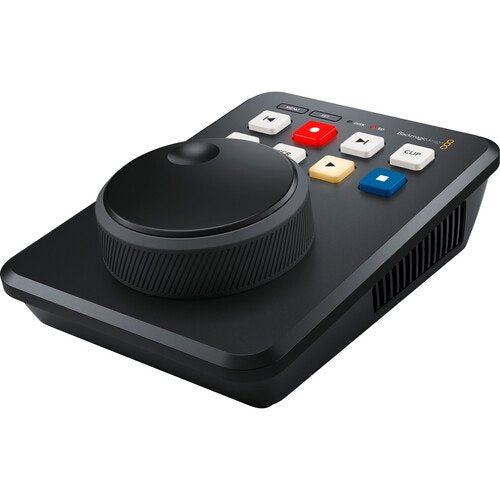
Blackmagic Design HyperDeck Shuttle HD — Product Guide
Blackmagic Design HyperDeck Shuttle HD from adds a desktop shuttle to quickly and readily play back footage clips.
The HyperDeck Shuttle HD provides a compact design that permits you to run your HDMI footage in and out and connect to a computer or ATEM selector to control media playback through its large search dial and keys.
It additionally contains a built-in teleprompter to apply any text files, eliminating requiring third-party software.
The Shuttle HD runs Blackmagic OS, handles ProRes and DNx file formats, and it is compatible with a diverse group of editing software such as Premiere Pro, Avid, and DaVinci Resolve.
It can additionally be used to stream H.264 footage to broadcasting services such as YouTube or Vimeo.
It can be used to capture video through its SD medium slot or USB Type-C feed to an optional drive, or you can connect to the Blackmagic MultiDock to capture to several SSDs.
The Ethernet port provides outboard control and file transfers over a installation.
Mastering Recorder: Guide
With support for H.264, ProRes, and DNx files, you can capture true broadcast masters.
You can even choose between PCM or AAC audio.
That's great for higher-quality mastering whenever used with ATEM Mini switchers.
You get all tasks needed to send shows to broadcast teams and for uploading to broadcasting services such as YouTube.
Media Player: Guide
The large search dial lets you graphically browse your mount library, then you can use the previous mount control to cue the start of the mount.
After playing, you can use the mount control to stop the playback at the end of the mount.
ATEM switchers can even off-site control HyperDeck Shuttle through Ethernet.
Traditional Broadcast Deck operation
HyperDeck Shuttle incorporates a control panel that's very fast to use, and the keys are similar to a conventional broadcast deck.
Simply press the capture button and you instantly start capture the footage source to a file.
The large machined metal search dial handles shuttle, jog, and scroll so you can find clips fast.
Plus, all deck control functions can be triggered from a distance using the Ethernet installation.
Practical Notes: UHS-II Cards and HyperDeck Shuttle HD Supports SD Cards
HyperDeck Shuttle accommodates capture to common SD and UHS-II cards so you don't requirement expensive custom media.
SD cards are the strong choice for broadcast media since they are small and very affordable.
Plus, you can even capture to outboard drives via USB Type-C. When through USB disks, if you use a USB hub or Blackmagic MultiDock, you can even capture on several disks for nonstop recording.
When through H.264, the files are so small you get very long captures even on more compact low-cost cards.
This means you can capture up to 157 hour period of H.264 in 1080p59.94 on a 1TB medium.
Practical Notes: H.264 Files and HyperDeck Shuttle HD Popular ProRes, DNx,
HyperDeck Shuttle HD handles the most widely chosen codecs in use today, covering broadcast-quality DNx and ProRes file formats.
You additionally get space-saving H.264 whenever capture in NTSC, PAL, 720p, 1080p plus even true 1080i interlaced formats.
That means you get tight 60:1 to 285:1 compression ratios for very small files at full broadcast fidelity.
Plus you can choose uncompressed PCM audio, or even AAC audio whenever uploading files to YouTube.
HyperDeck Shuttle HD handles both ExFAT employed on Windows and HFS+ employed on macOS disk formatting standards, so disks can be mounted and read on both platforms.
It additionally allows capture long-duration events into a single footage file.
operation Connections and Video
The HDMI source can be connected to cameras and switchers such as ATEM Mini, and the HDMI feed can be connected to displays for presentations or ATEM Mini switchers as a long-form media subject.
The rear panel additionally incorporates a 12 VDC power source and a power supply is supplied. The 1 Gigabit Ethernet link enables control and off-site file uploads.
HDMI Compatibility: ATEM Mini Switchers
With built-in HDMI source and feed, you can connect to consumer cameras, displays, televisions, footage projectors, and even ATEM Mini switchers.
The HDMI links will automatically switch footage standards to accommodate both SD and HD hardware.
HyperDeck Shuttle HD Built-In Teleprompter: Guide
With such a large search dial, HyperDeck Shuttle HD can be employed as a teleprompter.
Simply change to teleprompter in the capture menu and it will read standard RTF text files such as scripts, without requiring custom software.
Scripts can be written in simple text editors such as TextEdit.
You can move between several scripts with the previous and next mount buttons.
If you push both jog and scroll keys, you can live scroll the script such as a conventional teleprompter, as well as refine the size and font displayed.
You can additionally visit here.
Practical Notes: Streaming Sites and Compatible with Software
HyperDeck Shuttle HD records files that are compatible with virtually all post-production software.
Plus if you capture in H.264, you can upload files from HyperDeck Shuttle immediate to broadcasting services such as YouTube, Facebook, Vimeo, and Twitter.
You can use widely chosen editing software such as DaVinci Resolve, Apple Final Cut Pro, Adobe Premiere Pro, or Avid Media Composer since HyperDeck uses the identical file formats employed in post-production.
Even VFX software such as Fusion and Adobe After Effects operate with the files.
Since HyperDeck records to disks formatted on computers, you can simply fitting the disk on any computer and start editing eliminating needing to copy files.
Practical Notes: Cameras and Compatible with Switchers, Disk Docks,
As HyperDeck Shuttle doesn't incorporate SSD slots, you can attach a Blackmagic MultiDock 10G to use regular SSDs, enabling compatibility with media from other HyperDeck versions, and HyperDeck Shuttle will manage several disks for you.
HyperDeck Shuttle is additionally a perfect mastering recorder whenever used with ATEM switchers, since it has more capture formats, plus it's a great mount player for attaching pre-recorded clips into live workflow.
For more information click here.
[caption id="" match="alignnone" width="1000"]
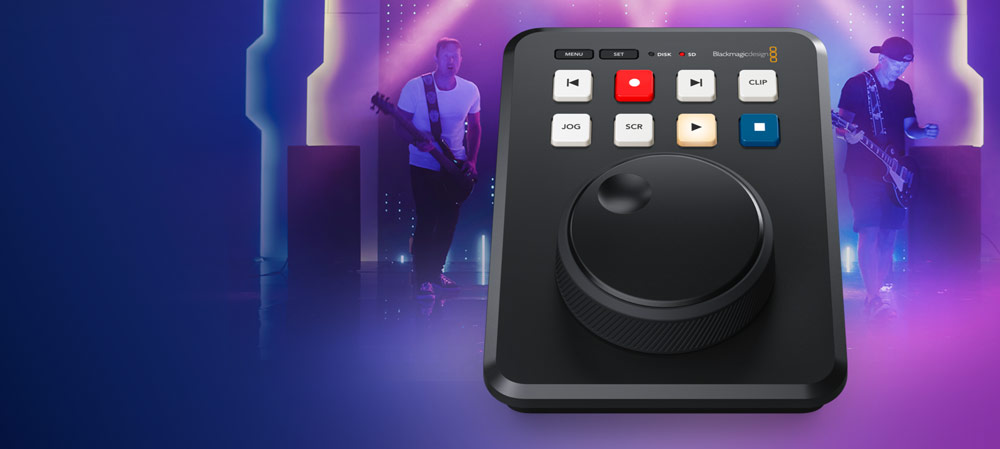 Blackmagic Configuration HyperDeck Shuttle HD [/caption]
Key Features
- Compact Desktop Media Player/Recorder
- Broadcast Deck Controls with Search Dial
- Records to SD Cards or USB Type-C Disks
- HD and Full HD Recording up to 60p
- H.264, ProRes, and DNx File Formats
- 1 Gb/s Ethernet and USB Type-C Ports
- HDMI In and Out Ports
- Webcam Ability; Teleprompter Function
- Blackmagic OS
Shop by Categories


Explore other brands


