


 SKU: HYPERD/RSTEX8KHDR
Blackmagic Design HyperDeck Extreme 8K HDR
Blackmagic Design HyperDeck Extreme 8K HDR
In stock
View full details WhatsApp us for inquiries

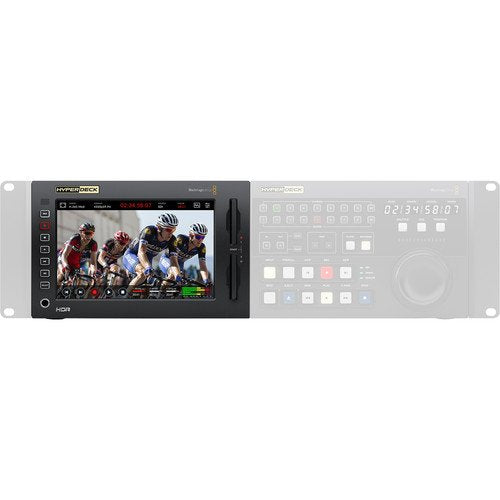
Blackmagic Design HyperDeck Extreme 8K HDR — Product Guide
The Blackmagic Design HyperDeck Extreme 8K HDR from is an 8K recorder built around a large screen with standard touchscreen deck settings for viewing captures.
It additionally has hardware deck settings on the unit's left side and two CFast medium slots on the right.
Ideally, it would be employed together with the optional HyperDeck Extreme Control deck, which offers traditional deck control integrates with a built-in editor for automating the ingest of legacy videotape-based programming.
Both deliver the identical 3 RU, half-rack width size and can be installed beside every other in a rack and combined into a conventional broadcast deck for a broad process.
The HyperDeck Extreme 8K HDR integrates Quad 12G-SDI interfacing for 8K definition, analog links for archiving, and a USB Type-C Outboard Disk port, which can be employed to connect flash disks or entire disk systems such as the Blackmagic MultiDock 10G 4-slot SSD dock.
There is additionally a slot for an optional M.2 PCIe NVMe cache medium, which eliminates dropped frames if your media becomes full or runs too slow.
The HyperDeck Extreme 8K HDR uses the space-saving H.265 codec but additionally accommodates ProRes 422 HQ, ProRes 422, ProRes 422 LT, and ProRes 4444.
This means more compact file sizes plus compatibility with virtually all widely chosen editing software.
HDR standards are supported and the screen screen has a wide colour gamut to match.
The display provides built-in observation scopes, and these can be changed to HDR scopes whenever working in HDR formats.
The HyperDeck Extreme 8K HDR tags files with the correct HDR information, and then SDI and HDMI sources automatically detect HDR footage standards.
Stationary metadata PQ and HLG formats are handled matched to the ST2084 standard.
The high-luminance LCD can handle both Rec. 2020 and Rec. 709 colour spaces. Because of the wide colour gamut, it can even accommodate 100% of the DCI-P3 configuration.
The HyperDeck Extreme 8K HDR integrates an onboard 100-240 VAC power supply plus a 4-pin XLR 12V source for connecting an outboard power supply or battery, enabling for efficient soundstage or location use.
Blackmagic HyperDeck Working Configuration and Blackmagic HyperDeck software are provided as free downloads with the HyperDeck Extreme 8K HDR.
Two HyperDeck Extreme 8K HDR units, or one device plus one HyperDeck Extreme Control, can be installed in a rack or console through the optional HyperDeck Extreme Rack Kit.
For more information click here.
Practical Notes: Archive and Ideal for Live Production, Digital Signage,
HyperDeck Extreme is intended for live workflow as a master recorder, mount player, and for capture ISO cameras.
The analog sources allow you to capture from old footage tapes, so legacy programming can be employed on the current broadcasting services or for use in editing. Electronic signage in 8K is simple with HyperDeck Extreme as it has 10G Ethernet for fast media uploads, plus it integrates a simple off-site control protocol. You can even use it as a focus area recorder as it incorporates HDMI, SDI, and analog sources with built-in scopes and 3D LUTs. The scopes additionally help you QA masters to maintain compliance with broadcast standards before broadcasting and broadcast.
Convert Legacy Programming for Broadcasting
As broadcasting services deliver become common, preserving cultural diversity via maintaining localized material is increasingly important.
The option is to get every country's legacy programs onto broadcasting services at an affordable cost.
HyperDeck Extreme Control lets you connect to legacy broadcast decks, location an in and an out position, then edit.
Combining the HyperDeck Extreme 8K HDR with the optional HyperDeck Extreme Control, and attaching the two to every legacy deck, enables constant archiving by only one operator.
It's even possible to edit across formats by through the optional Blackmagic Teranex Express to convert tapes from SD to HD in one step.
You can control numerous decks, comprising Digital Betacam, 1" C configuration, and Betacam SP.
media playback Full Resolution 8K and Record
Quad Link 12G-SDI permits capture and playback in full definition 8K.
The SDI links are multi-rate, so you can use Quad Link 12G-SDI to get compatibility with other 8K devices, or selector to SD, HD, or UHD through the single link 12G-SDI link.
To enable regular CFast cards to be captured at high-resolution 8K, HyperDeck Extreme uses modern H.265 files for 8K capture and playback.
This means HyperDeck Extreme 8K can be connected to the current 8K televisions and projectors. It additionally works well with ATEM switchers.
Large, Bright Screen for Easy Touch operation
The touchscreen screen offers dedicated keys for play, stop, and capture, and has a mini timeline for scrolling via your captures.
You can even picture swipe to jog.
The LCD incorporates a heads-up display of timecode, footage standard, media status, and audio meters.
Scopes, concentrate, and exposure assist can additionally be pulled up. Additionally, you can load and save 3D LUTs.
You additionally get immediate keys for transport control.
Dual CFast Card Slots: Guide
CFast media support enables you to capture to commonly provided flash memory cards.
The H.265 files are small enough to enable long captures on standard CFast cards.
With two CFast medium slots, you can swap out any full cards even during capture, allowing non-stop recording.
Record Direct to External USB Type-C Media Disks: Guide
If capture to other media kinds is required, then the USB Type-C Outboard Disk port lets you plug in an outboard flash disk for capture.
USB Type-C flash disks deliver many benefits, such as the ability to capture to the identical disk you are through or editing.
Plus, flash disks are fast and can capture high files rate formats that are too big for CFast cards, such as real-time ProRes in 8K.
Optional Media Cache Eliminates Dropped Frames: Guide
Sometimes your media can fill before you change to a blank medium; or, if the medium is too slow, you can get dropped frames in your capture.
To eliminate this problem, you can install an optional PCIe flash disk into the HyperDeck Extreme 8K HDR to use as a capture cache.
This eliminates problems with CFast media or outboard disks, as the cache will without manual intervention take over and capture any material the media could not acquisition.
Even if a card fills, capture will continue to the cache until it's swapped. The cache even lets you capture formats that are too fast for the media medium or outboard disk.
Practical Notes: Legacy Analog and Quad Link 12G-SDI, HDMI,
HyperDeck Extreme 8K HDR incorporates a broad variety of footage and audio links, including multi-rate Quad Link 12G-SDI for SD, HD, UHD, and 8K SDI devices.
The 12G-SDI feeds support fill and key whenever playing RGBA 4:4:4:4 files.
A multi-rate HDMI port is provided for consumer televisions and footage projectors.
For archiving work, HyperDeck additionally has both well-controlled analog and hi-fi audio, plus timecode links.
For observation, there's a down-converted monitor SDI feed that incorporates overlays.
The USB Type-C link lets you plug in flash disks or disk arrays for capture.
A 10G Ethernet is provided for high-speed upload through FTP protocols.
Bright Wide Gamut LCD and enhanced HDR Support
You'll be prepared for the latest HDR processes with support for the current HDR standards and a high-luminance screen with a wide colour gamut.
The built-in scopes change to HDR scopes whenever working in HDR formats.
Files are tagged with the correct HDR information, then SDI and HDMI sources will additionally automatically detect HDR footage standards.
Stationary metadata PQ and HLG formats are handled matched to the ST2084 standard.
The high-luminance LCD has a wider colour gamut, so it can accommodate both Rec. 2020 and Rec. 709 colour spaces.
The built-in HyperDeck Extreme 8K HDR LCD colour gamut can even accommodate 100% of the DCI-P3 configuration.
Built-In Scopes Ensure Compliance to Broadcast Standards: Guide
HyperDeck Extreme contains full onboard waveform observation so you can maintain compliance to broadcast standards whenever used on premium work.
The waveform display provides a conventional luminance (luminance) levels view of your source or playback feed.
The vectorscope display enables you to see the output level of colour at 100% SDI reference levels.
You additionally get RGB and YUV parade displays which are excellent for colour correction and checking for illegal levels.
Histogram shows the spread of white to black detail in your pictures and highlights or shadowing clipping.
The built-in scopes can be overlaid on live footage or as a small picture-in-picture see at the top right of the scope.
Practical Notes: ProRes Files for Wide Compatibility and Standard H.265
8K has four times as many pixels as UHD, so HyperDeck Extreme 8K uses H.265 files for 8K capture to lower costs and make working with 8K files simple.
H.265 files are extremely small and deliver a selection of 60:1 to 285:1 compression ratios.
Plus, H.265 is currently supported on all major working systems. You can use H.265 for all 8K, UHD, or progressive HD formats.
HyperDeck Extreme 8K HDR even accommodates ProRes 422 HQ, ProRes 422, and ProRes 422 LT for capture and playback plus ProRes 4444 for playback to fill and principal out.
This means files will be compatible with software such as DaVinci Resolve, Media Composer, Premiere Pro, and Final Cut Pro X.
Analog Audio and production Multichannel SDI
HyperDeck Extreme 8K HDR handles professional audio for modern broadcast teams or archiving from older broadcast decks.
Whenever working in SDI formats, you can capture 2, 4, 8, or 16 channels of audio in real time.
For capturing legacy programming, there are four XLR analog audio sources that let you capture all four channels from Betacam SP decks.
You can display through four on-screen audio meters with user-selectable VU or PPM ballistics.
For consumer devices such as VHS, DVD, and set-top boxes, there are immediate hi-fi audio sources.
The analog links have additionally been developed to low-noise and low-distortion broadcast specifications.
Fastest Networking: Modern 10G Ethernet
With 10G Ethernet, HyperDeck Extreme 8K HDR fits digital signage since off-site uploads are extremely fast.
The Ethernet uploads are much faster than CFast medium transfer speeds.
You can use Telnet to test control commands. Simply log into HyperDeck and then type "play" or "capture", and it will execute the command.
To upload media files from a distance, you can use FTP or even use simple FTP client software.
Whenever the Ethernet protocol and FTP is employed with large USB-C disk arrays, HyperDeck Extreme becomes a broadcast server for ingest, media handling, and playout.
Traditional RS-422 Broadcast Deck operation — Blackmagic Design HyperDeck — Product Guide
HyperDeck Extreme 8K HDR incorporates wide protocol support so you can connect it straight to broadcast systems.
It additionally accommodates extra commands for the Enhanced Media Protocol for managing disk recorders.
Whenever designing RS-422 control solutions, you'll know you're connected to a HyperDeck Extreme 8K whenever you see the ID 0xF0E0 in 30/60p, 0xF1E0 in 25/50p, or 0xF2E0 in 24p.
The full location of support off-site commands are supplied in the instruction manual and provided on the Blackmagic website.
Practical Notes: More and Compatible with Controllers, Switchers, Converters,
Aside from the abovementioned compatibility with the HyperDeck Extreme Control, MultiDock 10G, Teranex Express, and broadcast decks, the HyperDeck Extreme 8K HDR additionally works as a great mastering recorder or for mount playback and ISO reordering with the Blackmagic ATEM Constellation 8K.
For observation, the Teranex SDI to HDMI 8K permits broadcast observation on a television and it additionally has display calibration, 3D LUTs, and on-screen scopes.
Works: the World's Most Popular Video Software
The files from HyperDeck Extreme 8K are common so they are compatible with all working systems and most footage software.
Media can be formatted through ExFAT or HFS+ so you can readily availability the media on computers and availability the files like regular disks.
Localized for 11 Popular Languages: Guide
Several languages are completely supported. The interface supports eleven languages: Chinese, English, French, German, Italian, Japanese, Korean, Portuguese, Russian, Spanish, and Turkish.
On startup, the HyperDeck Extreme 8K HDR will screen a menu for selecting a language.
You can additionally change the language later.
Whenever a language is chosen, the on-screen text overlays, all menus, and the overlays on the SDI observation feed will change.
The HyperDeck Extreme 8K HDR makes it easier to operate in international sites with international crews.
You can additionally visit here.
[caption id="" match="alignnone" width="1000"]
 Blackmagic Configuration HyperDeck Extreme 8K HDR [/caption]
Key Features
- Large LCD with Touchscreen Deck Controls
- Physical Controls, Two CFast Card Slots
- Quad 12G-SDI, HDMI, and Legacy Analog
- Fast USB Type-C Disk Port; 10G Ethernet
- PCIe Cache Card Slot
- H.265 Recording/Playback, ProRes Support
- Rec. 2020/709 Support, HDR Scopes
- SDI/HDMI Auto HDR Detection
- Multichannel SDI and Analog Audio
- Load and Save 3D LUTs
Shop by Categories


Explore other brands


