


 WhatsApp us for inquiries
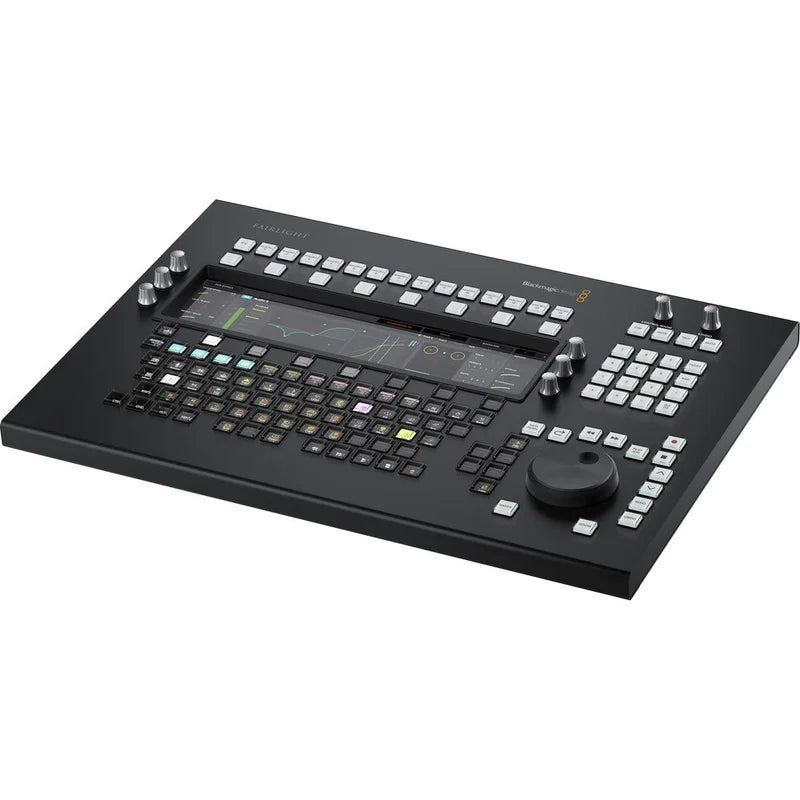
In this camera's design, Leave the mouse alone and step up to accurate, high-speed editing for DaVinci Resolve 17 systems with the Blackmagic Design Fairlight Desktop Audio Editor, a standalone control panel that connects via Ethernet directly to your host computer. Developed Drawing on more than two decades of professional audio-engineering experience, every Fairlight Desktop Audio Editor element is designed for efficient, fluid operation.
A high-resolution 12" LCD responds to the task by selecting one of five layouts while you perform distinct tasks, letting you work naturally and see relevant information immediately. Speed of operation is additional improved through a precision search dial, transport section, number pad, programmable macro keys, and touch-responsive control knobs. Additionally, the Fairlight Desktop Audio Editor incorporates a task-responsive custom keyboard whose self-labeling picture keys place nearly every Fairlight-page function within the editor's reach.
Integrated LCD: Guide
The Fairlight Desktop Audio Editor incorporates a large 12" high-resolution LCD with soft buttons and knobs. It's an interactive audio editing dashboard with five distinct layouts, giving you a full graphical interface for EQ, dynamics, plug-ins, and other tasks. For each activity, the display switches automatically to the relevant controls, tools, and information. This lets you work quickly since work can continue without reaching for a mouse or shifting attention to the computer monitor. For example, whenever adjusting an EQ, you'll see the parametric equalizer curve on the display. You can use the knobs to refine the gain in distinct frequency ranges and see instant feedback as the curve changes.
EQ Layout: Guide
Complete adjustment of the four-band parametric equalizer is available in the clip EQ view for the chosen clip. This gives you all the same EQ controls that are provided in the Inspector in DaVinci Resolve, along with clip-EQ preset options.
Standard Mixing: Guide
The standard mixing layout displays information for the currently chosen track. This incorporates level, pan, meters, the 6-band parametric track EQ, dynamics, and more. The soft buttons and knobs give you quick access to common controls.
Plug-Ins: Guide
This layout displays controls for the first plug-in on the chosen track. Across three screen pages, operators can bypass or reset a plug-in, load and store presets, and assign plug-in parameters to any of six rotary controls.
Aux Sends: Guide
The aux view presents panning and send levels for as many as 24 auxiliary channels simultaneously. The soft buttons along the top of the screen let you permit distinct aux channels for the active tracks.
Monitor Mode: Guide
The observation mode layout supplies a visual readout of fixed and dim settings together with studio, loudness, and control-room metering. It additionally displays a graphical representation of the speaker configuration for your listening setting.
Custom Function Keyboard: Guide
The custom keyboard incorporates clearly legible keys that relabel themselves across task-specific views, covering almost the complete Fairlight feature set. The pictures on the keys change based on the task you're performing, so you can work quickly.
Programmable Macro Keys: Guide
Macro keys can be used to store reusable keystroke sequences, accelerating operation through automation of repetitive work. There are 14 dedicated macro keys along with a setting for displaying 30 macros on the keyboard.
Transport operation
Navigation keys and the Search dial let you quickly move around the timeline, capture, search, playback at variable speeds, set locators to jump to a new position, and more. They can additionally be used to zoom, refine levels, shape fades, and trim edits.
Easy connections
The 10/100/1000 Base-T Ethernet port enables simple integration with your DaVinci Resolve 17 system. Additionally, a USB Type-C port is provided for software configuration (via Fairlight Studio and Console setup utility) and software updates.
Convenient Software Upgrades: Guide
The Fairlight Desktop Audio Editor utilizes an onboard software upgrade function via an updater use.
Internal powering Supply
Equipped with an onboard supply, the Fairlight Desktop Audio Editor avoids a bulky, unattractive external power adapter.


