


 SKU: DWCSWA/MODC360P
Blackmagic Design Ethernet Switch 360P
Blackmagic Design Ethernet Switch 360P
In stock
View full details WhatsApp us for inquiries

Blackmagic Ethernet Switch 360P: Guide
Considering the complete platform, Tailored for the needs of the film and television sector, Blackmagic Configuration introduces the Blackmagic Ethernet Switch 360P, delivering strong performance coupled with minimal latency. The switch combines high-speed 10GbE ports with two faster QSFP interfaces that accept copper connections or optical modules. The front panel contains a built-in panel, facilitating effortless setup of 2110 IP multicasting via familiar footage routing protocols, eliminating the necessity for a dedicated team of IT specialists.
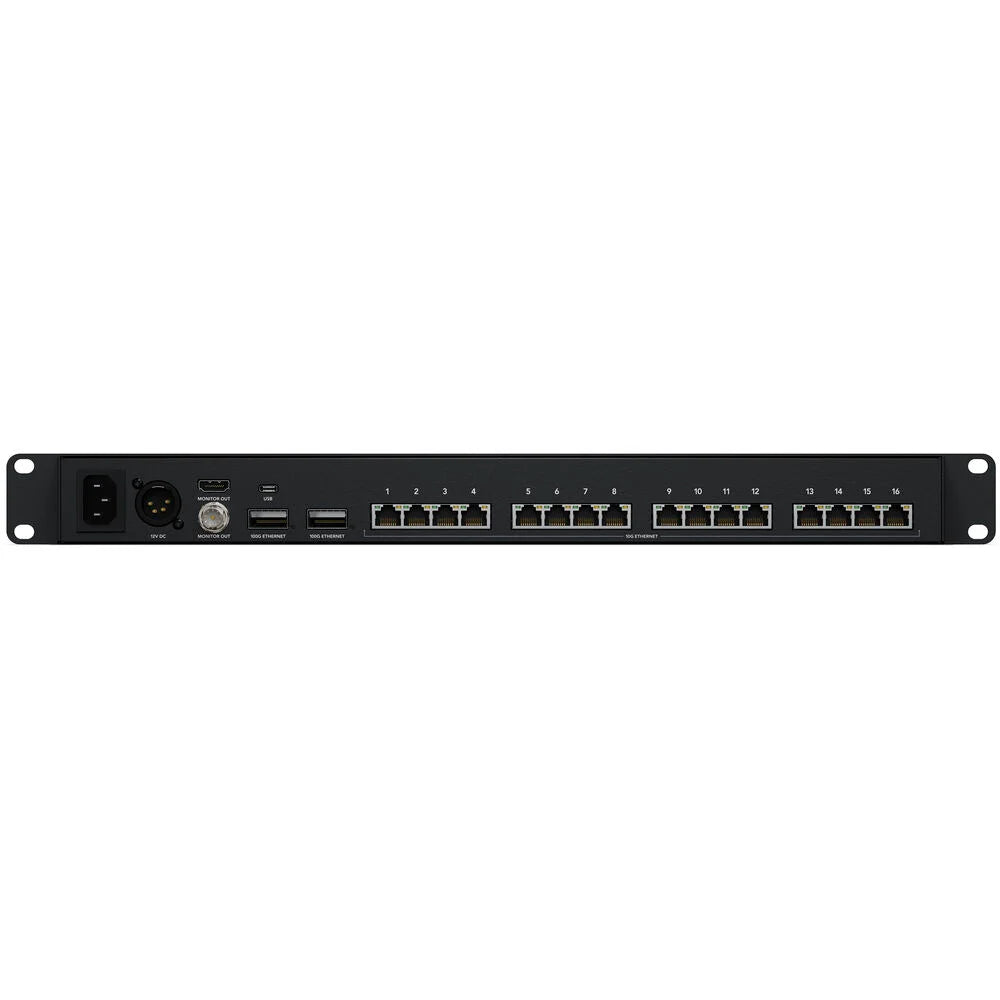
A router-like front panel groups the controls, display, buttons, and adjustment wheel, while network connections occupy the rear of the fully featured switch. Supporting SMPTE 2110 footage standards, it provides sixteen 10 GigE RJ45 ports and two 100 GigE RJ45 ports located at the back, facilitating streamlined cable management. Perfect for intricate configurations, the Ethernet Switch 360P is an ideal choice for fly-pack setups and space-efficient broadcast trucks. Furthermore, each port's monitor feed displays a speed graph, while the front screen dynamically showcases alphabetical labels for connected 2110 devices, preserving swift identification.
Construct 2110 IP Infrastructures and Foster Collaboration
- Utilize the Ethernet Switch 360P to establish compact 2110 IP setups suitable for fly-pack kits or compact broadcast vehicles.
- Forge a comprehensive ISO recording and replay solution by leveraging the 10GbE ports, DaVinci Resolve workstations, and establishing connectivity to a Blackmagic Cloud Store Max via one of the 100GbE ports.
- Effortlessly manage your video equipment remotely through the rear-panel Ethernet connections.
Blackmagic Ethernet Switch 360P Offers Swift Ethernet connections

- Sixteen autonomous 10GbE ports featuring RJ45 connectors offer straightforward cable management with ample space for cable disconnection. These ports serve multiple purposes, from constructing expansive HyperDeck ISO recorder arrays to linking numerous DaVinci Resolve workstations for editors and colorists.
- Two autonomous 100GbE ports deliver unparalleled speed and can be utilized to form loops between multiple Ethernet Switch 360P units, serving as a robust 100GbE backbone. For extensive ISO recording/replay systems, establish a direct connection between a Blackmagic Cloud Store Max and the 100GbE interface.
- Opt for short copper cables or longer optical fiber QSFP modules to extend the reach of multiple switches across considerable distances.
video signal Router operation Panel
The Ethernet Switch 360P uses a router-style control panel to create isolated IP systems without requiring an IT specialist to configure multicast routing. Sporting the same user-friendly interface found on Blackmagic Videohub routers, this panel incorporates a precision-engineered metal spin knob, a vibrant color LCD, and intuitive shortcut buttons. Navigating via IP footage sources is as simple as scrolling and pressing the take button to establish links, with the Blackmagic Ethernet Switch 360P seamlessly configuring all multicast settings in the background, sparing operators from the complexities of IT configurations. With each new 2110 IP device automatically detected upon link, this switch epitomizes true plug-and-play operation.
Blackmagic Ethernet Switch 360P Offers Visual Monitoring via HDMI Output: Guide
In the realm of broadcast, preemptive awareness is paramount to preempting potential issues. The Blackmagic Ethernet Switch 360P is equipped with an HDMI feed that provides a diverse visual representation of each Ethernet connection's status. Connect any HDMI-enabled TV or computer monitor to access real-time updates on link speed and current data transfer rates. Moreover, live data graphs for each port deliver invaluable insights into data rates compared to port capacity over time. These graphical representations prove particularly useful whenever managing several capture streams to storage, enabling swift identification of bandwidth constraints or data interruptions. Furthermore, the monitor feed displays customizable switch and connected 2110 IP device names, enhancing overall observation efficiency.
Key Features
- Designed for SMPTE 2110 Video
- Video Router Controls on Front Panel
- Ethernet Switch with Ports on Back
- 16 x 10GbE and 2 x 100GbE RJ45 Ports
- For Complex Configurations, Multicasting
- Speed Graph on Monitor Out for Each Port
- Dynamic Labels for 2110 Connections
- Ports Located on Back, Easier Cabling
- Devices Display Alphabetically at Front
- For Fly Kits and Small Broadcast Trucks
Shop by Categories


Explore other brands


