


 SKU: DV/RES/AADPNL
Blackmagic Design DaVinci Resolve Advanced Panel
Blackmagic Design DaVinci Resolve Advanced Panel
In stock
View full details WhatsApp us for inquiries

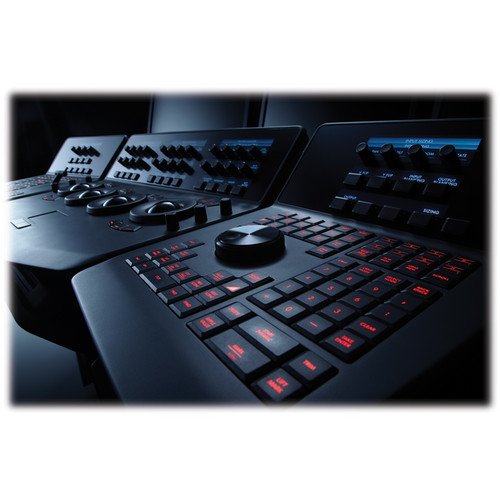
Blackmagic Design DaVinci Resolve enhanced Panel — Product Guide
The Blackmagic Design DaVinci Resolve Enhanced Panel offers substantially broader operation than the Micro and Mini control surfaces.
A central console with a retractable keyboard is flanked by two auxiliary control surfaces.
Nearly every DaVinci Resolve parameter and command is reachable through a dedicated single-touch control.
At the center are four weighted high-resolution trackballs plus 30 configurable soft knobs that expose Resolve's color-grading tools.
Each customizable knob offers 4096 increments per turn plus push-to-reset operation for precise color adjustments in DaVinci Resolve.
A retractable keyboard supports file naming and renaming, then slides out of sight when the task is finished.
Dedicated buttons expose every function, including reference controls and a fader T-bar for wiping between reference images.
You can readily control the picture sections through keys located for simple access at your lifelike hand settings.
The trackballs handle RGB operation together with lift, gamma, and gain adjustment.
Five high-resolution LCD panels present menus, status indicators, and the current assignments for buttons and knobs. Touch-sensitive soft knobs adjust parameters precisely, while their contactless electrical design avoids mechanical control wear.
Aesthetically illuminated keys are backlit through RGB colour and output level. Timeline and deck operation centers on the jog/shuttle dial with its accompanying transport controls.
Click here for more.
Soft Knob operation and Menus, Soft Keys,
All Resolve panels deliver context-sensitive keys and configurable rotary controls inside the LCD panel, which deliver an accurate image reference to the control eliminating the risk of error.
Trackball Panel: Guide
Four trackballs occupy the central panel, each encircled by its own adjustment ring.
During primary grading in Resolve, the leftmost three trackballs adjust lift, gamma, and gain.
Whenever in Log grading, they refine lowlights, mid-tones, and highlights. A fourth trackball operates like a mouse to move the onscreen pointer.
It also draws Power Windows, positions color-curve points, and provides offset adjustment for the primary grade.
Keyboard: Guide
The center panel contains a slide-out keyboard that is valuable whenever managing filenames, then retracts neatly when no longer required.
Luminance: Guide
- Y lift control: Adjust the contrast of the image in the darker areas, specifically in the Y (luminance) channel only. This adjustment allows for changing the black point without changing saturation.
- Y gamma control: Adjust the contrast of the image in the mid-tone areas, specifically in the Y (luminance) channel only. This control helps add depth and extra vibrancy to shots.
- Y gain: You can reduce hot spots or tweak the whites to define a look.
Contrast: Guide
- Contrast control: Increase contrast to make the blacks darker and the whites brighter, or decrease contrast to do the opposite.
- Pivot: Change the center of tonality about which dark and bright parts of the image are stretched or narrowed during a contrast adjustment.
- Mid-tone detail: Affect the contrast of regions of the image with high edge detail to increase or decrease the perception of image sharpness and definition. It's often used for softening facial features, making it popular for beauty shots.
Detail: Guide
- Color boost control: Raise the saturation in regions of the image with low saturation while leaving properly saturated areas alone. Also known as a vibrance operation, this is useful for adding color without oversaturating the image.
- Shadow control: Selectively lighten or darken shadow detail without affecting your image's mid-tones.
- Highlight control: Enable retrieving blown-out highlight detail in high dynamic range media by lowering this parameter. This allows you to achieve a smooth blend between the retrieved highlights and unadjusted mid-tones, for a natural-looking image.
Saturation: Guide
Increases or decreases total picture saturation; you can turn your colour picture into a grayscale picture with this control.
- Hue control: Rotates all hues of the image 360° around the color wheel. The default setting is 50, which retains the original distribution of hues.
- Luminance mix control: Controls the balance between the YRGB adjustments and Y-only adjustments made using the Y channel lift, gamma, and gain controls.
T-Bar Panel: Guide
A T-bar handles mix and wipe transitions, accompanied by dedicated menu and function buttons. The T-bar module mounts to the left or right of the Trackball section.
Transport Panel: Guide
Timeline transport functions, jog-and-shuttle operation, a numeric keypad, and related function keys are grouped on the Transport panel. The Trackball section accepts the Transport module to its left or right.
Configuration Requirements for DaVinci Resolve
Platform requirements as of DaVinci Resolve 18:
Minimum System Requirements for Mac OS: Guide
- macOS 11 Big Sur
- 8GB of system memory. 16GB when using Fusion
- Blackmagic Design Desktop Video version 12.0 or later
- Integrated GPU or discrete GPU with at least 2GB of VRAM
- GPU that supports Metal or OpenCL 1.2
Minimum System Requirements for Windows: Guide
- Windows 10 Creators Update
- 16GB of system memory. 32GB when using Fusion
- Blackmagic Design Desktop Video 10.4.1 or later
- Integrated GPU or discrete GPU with at least 2GB of VRAM
- GPU that supports OpenCL 1.2 or CUDA 11
- NVIDIA/AMD/Intel GPU Driver version–as required by your GPU
Minimum System Requirements for Linux: Guide
- CentOS 7.3
- 32GB of system memory
- Blackmagic Design Desktop Video 10.4.1 or later
- Discrete GPU with at least 2GB of VRAM
- GPU that supports OpenCL 1.2 or CUDA 11
- NVIDIA/AMD Driver version–as required by your GPU
For more information click here.
[caption id="" match="alignnone" width="1000"]
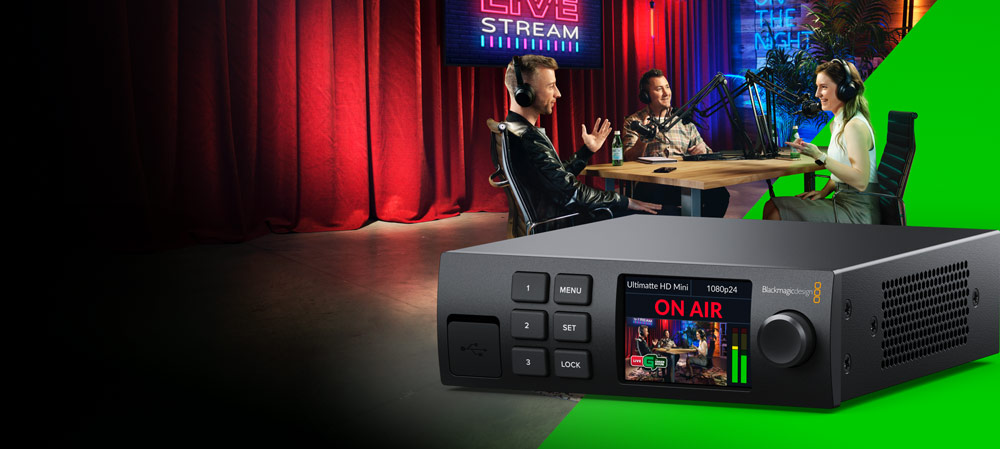 Blackmagic Design DaVinci Resolve Enhanced Panel [/caption]
Key Features
- Control Surface for Resolve Controls
- T-Bar Panel and Transport Panel
- Slide-Out Keyboard, Reference Keys
- RGB Lift, Gamma, Gain Trackballs
- Node-Based Real-Time Image Processing
- 32-Bit Floating Point/YRGB Processing
- 5 x LCDs with Real-Time Key Information
- 30 x Soft Knobs, Illuminated Keys
- Jog/Shuttle Knob and Transport Controls
- Compatible with Mac, Linux, Windows
Shop by Categories


Explore other brands


