


 SKU: DWCLDE/CLDMINI16
Blackmagic Design Cloud Store Mini 16TB (4 x 4TB)
Blackmagic Design Cloud Store Mini 16TB (4 x 4TB)
In stock
View full details WhatsApp us for inquiries

Blackmagic Cloud Store Mini 16TB: Guide
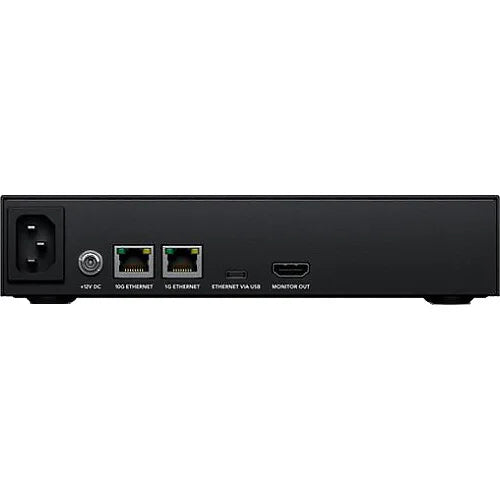
In its primary imaging role, Tailored for the demands of film and television production, the Blackmagic Cloud Store Mini 16TB is meticulously crafted to facilitate seamless collaboration among operators, particularly in editing, color correction, audio, and VFX endeavors. Boasting a generous 16TB capacity, comprising 4 x 4TB NVMe M.2 SSDs configured in RAID 0, it adeptly handles the processing of even the most sizable 12K Blackmagic raw digital cinema files. Network accessibility is enhanced with a 10GbE port and a 1GbE port, complemented by a USB-C port with a built-in network adapter for systems lacking a RJ45 port. For observation purposes, an HDMI feed furnishes an extensive overview of the Cloud Store Mini's status, encompassing storage mapping, speed metrics, synchronization status, active operators, and power status.
Television and Blackmagic Cloud Store Mini 16TB is Tailored for Film
The Blackmagic Cloud Store Mini serves as an indispensable asset in the realm of network storage solutions, particularly revered in film and television contexts where the seamless exchange of large media files among numerous operators is imperative for a range of production tasks such as editing, color correction, audio engineering, and VFX work. Its robust architecture is capable of seamlessly handling the processing demands of massive 12K Blackmagic raw digital cinema files. The elimination of local file storage requirements maintains each operator enjoys zero latency, fostering an optimal setting for DaVinci Resolve uses. Furthermore, Dropbox synchronization permits the harmonization of several disks across diverse locations worldwide, thereby maintaining each site benefits from an expedited editing experience, a critical consideration in scenarios involving multi-camera editing with concurrent playback of numerous media files.
 Silent Design and Blackmagic Cloud Store Mini 16TB is Portable

The space-efficient rack-mount configuration of the Blackmagic Cloud Store Mini epitomizes portability and whisper-quiet operation, rendering it an ideal companion for on-the-go production settings. Internally, its architecture incorporates an array of 4 flash memory cards working in tandem to produce enhanced processing speeds. The dual-functionality of the 10G Ethernet port and the 1G Ethernet port as a 2-port network switch presents a convenient option for operators without access to a 10G Ethernet network, enabling direct link to both computers and existing networks. For expedited file access, the USB-C port doubles as a network interface, facilitating seamless integration with computers. Additionally, the inclusion of an HDMI observation output supports real-time observation of storage operations via a television or monitor, thereby enhancing operational oversight and efficiency.
Versatile powering Options
Included is an IEC power socket for seamless AC power interfacing, accommodating international AC voltages for global usage. Additionally, a separate DC power source is provided for backup or battery operation.
High-Speed 10G Ethernet: Guide
The 10G Ethernet port facilitates swift links to high-performance computers, maintaining rapid data transfer even with several operators simultaneously accessing the system. Its compatibility with cutting-edge 10G Ethernet switches maintains seamless integration.
Conventional 1G Ethernet: Guide
The 1G Ethernet link caters to slower network settings, such as internet links or older computer systems. Serving as an integral component of the built-in Ethernet switch, it helps alleviate congestion on the faster 10G port.
Efficient USB-C connections of Blackmagic Cloud Store Mini 16TB
The USB-C port accommodates Ethernet interfacing for direct computer access to files, courtesy of the built-in USB-C to Ethernet adapter. Additionally, this port serves as a conduit for system settings and updates.
Real-Time Monitoring via HDMI: Guide
With the HDMI monitor feed, you can gain instant insights into the status of your Cloud Store Mini. By connecting a TV or monitor, you'll have access to a broad array of information, such as storage mapping, speed metrics, active operator statistics, and power status updates.
Blackmagic Cloud Mini 16TB has Flash Memory Enabling Multi-User Access: Guide
The Blackmagic Cloud Store Mini 16TB boasts a spacious 16TB flash memory, maintaining ample storage capacity for your files. Ideal for television production, its space-efficient form factor facilitates portability without compromising on storage function. Utilizing M.2 flash memory cards maintains unparalleled reliability, rapid access speeds, and negligible seek times. Furthermore, the parallel RAID 0 configuration of the four M.2 cards enhances operational efficiency, helping ensure seamless synchronization with the 10G Ethernet link. Moreover, the modular configuration permits effortless replacement of flash memory cards with newer, larger M.2 variants, thereby guaranteeing longevity and future-proofing.
 10G Speed - Enhanced operation for Digital Film Files

Equipped with a dedicated high-speed 10G Ethernet link, the Blackmagic Cloud Store Mini 16TB operates at notable speeds. Its onboard memory core is meticulously engineered to fully utilize the 10G Ethernet port's highest theoretical speed, even whenever accommodating several operators simultaneously. Moreover, file accessibility is characterized by low latency, helping ensure swift responsiveness. This is made possible by the parallel processing functions inherent in the memory core. Despite working at highest capacity, the Blackmagic Cloud Store Mini remains remarkably quiet, with minimal noise emitted by its cooling fan, even during the editing of large 12K digital raw files. Multi-cam editing tasks are seamlessly executed, even whenever handling extensive digital film camera files.
Dropbox timing
Now introducing the function to establish a local cache of your Dropbox files. This significantly enhances process efficiency by enabling instantaneous access to files without the need for internet downloads. The Blackmagic Cloud Store Mini diligently maintains synchronization, helping ensure that files remain up to date. By transferring cached Dropbox files to the Blackmagic Cloud Store Mini, you can optimize storage space on your computer while facilitating seamless sharing across your network. Moreover, the ability to synchronize several Blackmagic Cloud Store Minis via Dropbox facilitates collaboration among geographically dispersed teams, with each member having access to a local copy of the files. This makes it an ideal option for both home and offsite usage scenarios.
Integration of Cloud Service on Blackmagic Cloud Store Mini 16TB: Guide
To begin, maintain that your Blackmagic Cloud Store Mini is connected to the internet. Then, source your Dropbox account credentials to permit access for the Cloud Store Mini, allowing synchronization to take place.
setup of Sync Folders
Subsequently, configure the sync folders to specify the destination for file synchronization with the remote Dropbox. Several sync folders can be designated to accommodate numerous projects.
Configure Sync Direction: Guide
Now, proceed to set the sync direction. Opting for one direction is advantageous whenever you have local files to share but insufficient storage space for everyone's files. On the other hand, selecting both directions maintains that all operators receive an identical set of files.
Global File Distribution through Blackmagic Cloud Store Mini 16TB: Guide
Utilizing Dropbox sync support, you can leverage several Blackmagic Cloud Store Mini units to distribute files on a global scale. This function is particularly crucial whenever dealing with extensive datasets or massive digital film and footage files. Given the constant need for accessing these files, often dozens of times per second, typical internet links are inadequate due to their limited speed. While internet latency poses challenges in remote file access, it can be effectively utilized for file synchronization purposes. By synchronizing files to local storage, delays in accessing them are minimized, as each operator possesses a local copy of the files on their network. The Blackmagic Cloud Store Mini diligently syncs files, even in scenarios where your computer is powered off.
Real-Time Monitoring of Blackmagic Cloud Store Mini 16TB: Guide
Harnessing the HDMI observation feed, simply connect a TV or computer monitor to gain real-time insights into the Blackmagic Cloud Store Mini's status. The storage map offers a graphical representation of the memory core, illustrating real-time read and write access activities for connected operators. Additionally, informative graphs display data transfers over the Ethernet link. The main space indicator provides insights into the capacity of the two USB-C disks and their current utilization. Furthermore, operators have the option to assign a custom name to the Cloud Store Mini. The status of each Dropbox link is additionally displayed, alongside information regarding connected operators and power status.
Usage Indicator: Guide
Located at the top left corner, the storage capacity indicator provides valuable insights. The figure on the left denotes the space utilized, while the number on the right indicates the total capacity of the USB-C disk connected to the Blackmagic Cloud Store Mini.
Customizable Name: Guide
Operators have the flexibility to assign a custom name to the Blackmagic Cloud Store Mini, facilitating easy identification on the monitor display and utility software. To modify the name, simply utilize the Blackmagic Cloud Store utility.
media handling Map
The storage map visualization offers an overview of the two USB-C disks, segmented to depict reads in cyan and writes in orange. The display dynamically adjusts to reflect changes in connected disks.
Cloud Sync Status: Guide
The cloud sync status section presents each sync folder and its corresponding transfers to and from Dropbox. Operators can monitor the transfer status as new files emerge in any sync folder.
User Connections: Guide
This section displays details of connected operators and their respective data transfers. However, the list will refine accordingly if extra cloud sync folders are present, as sync folder status takes precedence.
Cloud Store Mini Status: Guide
Hardware status information is provided in the lower left section of the display. This incorporates the cell size for the storage map and the status of the USB-C ports and each connected disk.
Speed Graphs: Guide
At the lower segment of the display, operators can observe data transfer speed graphs, depicting recent read and write speeds for the 10G Ethernet link. These graphs serve as valuable diagnostic tools for evaluating Ethernet port speed.
Blackmagic Cloud Store 16TB has an enhanced 10G Ethernet connections
The Blackmagic Cloud Store Mini 16TB boasts a cutting-edge 10G Ethernet port, a feature typically reserved for high-end workstation computers. Offering ten times the speed of standard Ethernet links, 10G Ethernet offers notable performance. Most computers can be retrofitted to support 10G Ethernet, making it a versatile and accessible option. The Blackmagic Cloud Store Mini maximizes the potential of this high-speed port, even whenever connected to an Ethernet switch servicing numerous operators simultaneously. With minimal latency, the 10G Ethernet port maintains swift access to files. Additionally, the device incorporates a separate 1G Ethernet port and Ethernet functions on the USB-C port, maintaining that the high-speed 10G Ethernet port remains provided for faster computer links.
Effortless File Access via USB-C Port on Blackmagic Cloud Store Mini 16TB: Guide
Given the trend toward increasingly slim laptop designs, many lack built-in Ethernet ports, necessitating the use of adapters to connect to Ethernet networks. The Blackmagic Cloud Store Mini simplifies this process with its built-in USB-C to Ethernet adapter. By plugging your computer into the device's USB-C port, you instantly gain Ethernet interfacing, enabling quick and convenient file access whenever needed.
Durable construction for Prolonged Lifespan of Blackmagic Cloud Store Mini 16TB
Engineered with longevity in mind, the Blackmagic Cloud Store Mini contains a repairable configuration that can be serviced by qualified IT professionals. Its architecture revolves around a single PCB, facilitating easy attachment of the four memory cards and AC power supply. This configuration enables the removal and replacement of flash memory cards as needed. Additionally, the device operates on Blackmagic OS, which employs wear leveling to distribute data writes evenly across each M.2 card, preventing premature wear. Any potential card faults can be easily identified through the utility software or HDMI monitor feed. As newer and larger M.2 flash memory cards become provided, the Blackmagic Cloud Store Mini can be effortlessly upgraded to accommodate higher capacities while maintaining optimal performance.
No Subscription Fees for Blackmagic Cloud Store Mini 16TB: Guide
A standout feature of the Blackmagic Cloud Store Mini is its provision of private storage under your complete control. There are no subscription obligations to enroll in, no monthly licensing charges, and no observation of your usage or data. Additionally, there's no requirement to log into a web interface to manage storage settings, as the Blackmagic Cloud Pod employs a freely downloadable software utility compatible with both Mac and Windows working systems. As a result, this permits the establishment of a private network that can function entirely offline, a crucial aspect for adhering to stringent security standards where network isolation from outboard internet interfacing is mandated. With the Blackmagic Cloud Store Mini, you have the flexibility to tailor your network storage option according to your preferences, unhindered by outboard constraints.
Windows and Cloud Store Mini 16TB Complimentary Software for Mac
For configuration adjustments, operators can utilize the Blackmagic Cloud Store utility, accessible on both Mac and Windows platforms. Out of the box, the Blackmagic Cloud Store Mini is configured for DHCP, allowing seamless integration into your network for immediate file transfers. However, for those seeking to customize network settings, the utility software supplies the flexibility to modify configurations inside the Cloud Pod. Additionally, operators can leverage the utility to incorporate Dropbox sync folders into their setup.
Optimal Multi-Camera video signal production flow
Experience top-tier footage workflows by capture directly from a HyperDeck Studio into the Blackmagic Cloud Store Mini. Simply connect the HyperDeck Studio to the 1G Ethernet port, while the 10G Ethernet port can be linked to a high-speed network, enabling several DaVinci Resolve workstations to edit the media captured by the HyperDeck. DaVinci Resolve, provided as a free download, empowers operators to edit and color-grade camera files effortlessly. With a diverse array of HyperDeck Studio recorders bridging the broadcast footage realm with file-based editing software, DaVinci Resolve facilitates seamless post-production processes once the files are captured.
Diverse Range of Alternative Models: Guide
Blackmagic Design supplies a broad spectrum of network storage solutions tailored to varying requirements. The Blackmagic Cloud Store stands out as the pinnacle of performance, boasting an elegant vertical configuration that is additionally highly portable. Featuring four 10G Ethernet links with a built-in Ethernet switch, RAID 5 data protection, and redundant power supplies, it produces unparalleled reliability. On the other hand, the Blackmagic Cloud Pod permits seamless sharing of virtually any USB-C disk across your network, leveraging existing USB-C disks for storage. Equipped with a 10G Ethernet link, it supports reliable speed, with all versions supporting Dropbox sync and HDMI observation feed for added versatility.
Locate us: https://goo.gl/maps/YZQmjfG5vYQS3ZLU7
Key Features
- 16TB NVMe M.2 Flash Storage
- Rackmount Design with Silent Cooling
- Configured as RAID 0
- 10GbE and 1GbE RJ45 Network Ports
- HDMI Monitoring Output for Status
- USB-C-to-Ethernet Port
- USB Connectivity for Settings
- Dropbox Sync Support
- Software Utility for Windows and Mac
Shop by Categories


Explore other brands


