

 SKU: SWATEMTVSTC/K4K8
Blackmagic Design ATEM Television Studio 4K8
Blackmagic Design ATEM Television Studio 4K8
In stock
View full details WhatsApp us for inquiries
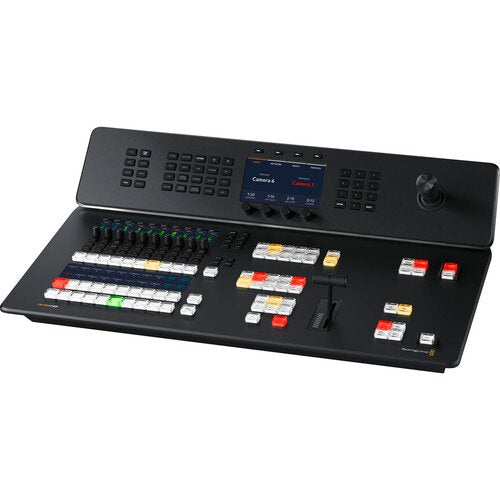
Blackmagic Design ATEM Television Studio 4K8 SWATEMTVSTC/K4K8 12G-SDI — Product Guide
At the core of the workflow, , introduces Blackmagic Design ATEM Television Studio 4K8 SWATEMTVSTC/K4K8 12G-SDI is an all-in-one live broadcasting switcher to your television soundstage, remote workflow, or live venue with the Blackmagic Design ATEM Television Studio 4K8 SWATEMTVSTC/K4K8 from Blackmagic Design. This space-efficient, redesigned live TV switcher is a strong addition to any streaming production, delivering eight 12G-SDI sources that support up to UHD 4K60 footage, built-in live broadcasting, USB webcam support, a 58-channel audio mixer, chroma keyers, DVE, transitions, media players, onboard recording, and talkback support. Blackmagic Design ATEM Television Studio 4K8 SWATEMTVSTC/K4K8 switcher is additionally compatible with the Blackmagic Cloud, so your program captures can be provided immediately from anywhere around the globe.
Live Production: Guide
With Blackmagic Design ATEM Television Studio 4K8 SWATEMTVSTC/K4K8 You get an 8-source switcher with both program and 10 aux feeds, so you have all tasks you need for mobile workflow. That means you can connect up to 8 inputs. Plus, you get professional body control, talkback, and audio mixing, all developed into a familiar broadcast panel.
Distribution through Atem Television Studio 4K8: Guide
Blackmagic Design ATEM Television Studio 4K8 SWATEMTVSTC/K4K8 has a built-in hardware broadcasting engine, you can live stream your event to a global audience. Capture to H.264 files with AAC audio means you get the correct configuration to upload to YouTube. Plus, you share live programs with your viewers by using the aux feeds and large displays and projectors.
Production Switcher operation
Blackmagic Design ATEM Television Studio 4K8 SWATEMTVSTC/K4K8 has enhanced broadcast-grade switcher, with built-in ATEM Enhanced Chroma Keyers, Fairlight audio mixer, DVE, still store for graphics, and more. Most features can be operated from the front panel, or you can use the free ATEM Software Control on macOS or Windows to availability even more features.
Practical Notes: Usage and Easy Setup
Simply push any of the program row keys on the front panel to cut between footage inputs. Alternatively, select a preview-row source first, then trigger either a direct cut or an effect transition with the Cut or Auto key. You can choose from exciting transitions, such as dissolve, or more dramatic effects, such as dip to colour, DVE squeeze, and DVE push. You can even attach a DVE for picture-in-picture effects with customized graphics. Blackmagic Design ATEM Television Studio 4K8 SWATEMTVSTC/K4K8 has There are additionally media players, which let you store graphics with alpha channels for titles and graphics that you can load as live footage sources. Then, you can live stream the results.
Redesigned Front Panel of Atem Television Studio 4K8: Guide
The front panel incorporates buttons for selecting inputs, triggering transitions, and setting up footage effects. Plus, the keys are the identical high-end type employed on expensive broadcast switchers. You additionally get a built-in T-bar for manual transition control and a three-axis joystick. The front panel even has an novel audio mixer-control region with live metering on a purpose-built LCD. There are additionally buttons for capture and broadcasting control, plus live aux switching that lets you change aux feeds between all 8 cameras, program, preview, or the multiview.
Broadcast-Style Mix/Effects Switching: Guide
ATEM Television Studio uses a professional program/preview style of operation, which is exactly the preference large broadcast teams use live workflow switchers. However, ATEM Television Studio can be switched to A/B style switching, which is easier whenever it's employed by volunteers or community groups. However, if you require to operate the switcher such as a broadcast professional, then the program/preview is strong. This means a source won't be put on air until you push the cut or auto control. This two-step process means you see what you are selecting before putting it to air, so you get fewer mistakes.
Add Exciting video signal Effects
One of the assists of ATEM Television Studio is the selection of professional built-in footage effects. The cut button maintains an instant cut whenever switching between inputs. The T-bar fader can be employed to transition footage effects, or you can do the transition without manual intervention by depressing the auto control. Auto uses the transition duration location in the platform control. You can additionally choose the type of effect you require, comprising mix, which does a level transition between inputs, or dip which transitions through a third footage source, such as a colour generator. There is a diverse group of SMPTE wipes supplied, plus DVE effects that slide or squeeze the picture off screen whenever transitioning between footage sources.
Creative Transitions: Guide
ATEM Television Studio incorporates the identical kind of transitions identified on expensive broadcast switchers. This means the effects and transitions can be customized in many distinct ways, so they are surprisingly capable. You'll never stop finding new ways of through them. That's since all transitions can be customized by refining parameters such as duration, border colour, border width, position, and direction. You can even use the DVE with a wipe transition, where the DVE shifts a graphic over the wipe edge. That's called a graphic wipe and it's often employed in sports broadcast work. The preview transition control can be employed to location up effects offline, which is great for removing mistakes.
Built-In DVE: Guide
ATEM Television Studio HD integrates an separate DVE that lets you reposition graphics and produce picture-in-picture compositions. You get strong quality and the DVE accommodates position, resize, and scale, all in real time. The DVE lets you produce professional picture-in-picture effects with customizable 3D borders, shadowing, and lighting. DVEs can additionally be employed to produce strong DVE transitions with squeeze, swoosh, and push effects for attaching excitement to your programming. You can even bring together DVE transitions with custom graphics to produce your own graphic wipe transitions. Plus, there is additionally a SuperSource multilayer computation engine with 4 extra DVEs.
Supports Internal Media: Guide
The built-in media pool shops broadcast-quality graphics and animations that can be played rear through the built-in media players. Media players appear as separate sources, so you don't need to waste any of the SDI sources for graphics. For highest fidelity, all media allows RGB colorspace with alpha channel, allowing transparency and layering. The media pool can hold 20 HD definition stills. Movement graphics clips for animations and stingers can be up to 720 frames in 720HD, 360 frames in 1080HD, and 90 frames in UHD 4K. The ATEM Software Control enables you to upload and manage media. You can even prepare graphics in Adobe Photoshop and then download to the media pool through the free ATEM Photoshop plug-in.
Includes 4 ATEM enhanced Chroma Keyers
Blackmagic Design ATEM Television Studio 4K8 SWATEMTVSTC/K4K8 is well suited to news and on-set presentation operate since it integrates 4 ATEM Enhanced Chroma Keyers for green display keying effects. The chroma keyers are incredibly capable and incorporate functions such as a colour picker to sample backdrop colors for automated generation of the principal parameters. You get accurate controls for edge and flare, and there is even a front plane colour corrector, so you can match the front plane and backdrop layers for smooth compositions. You can even use it for title overlays by creating graphics with a green or blue backdrop. With 4 ATEM Enhanced Chroma Keyers, ATEM Television Studio is well suited to creating fixed camera virtual locations.
SuperSource Processing: Guide
In addition to the DVE in the ATEM Television Studio, there is additionally a capable SuperSource multilayer processing engine. SuperSource gives you 4 extra DVE layers plus a backdrop dimension, all layered together as an extra input source. Any footage source can be employed as inputs for every DVE, then it's all layered together over a media pool custom backdrop or live footage. SuperSource is perfect for doing several picture-in-picture displays with people being interviewed since you can location up the effect, so the viewer can see every person being interviewed, all inside a stylish graphic. SuperSource is just such as having a completely separate multi-layer VFX switcher constructed in.
Atem Television Studio 4K8 offers 8 Standards-Converted 12G-SDI source connections
The ATEM Television Studio HD provides 8 independent 12G-SDI sources, with each source featuring its own purpose-built standards converter. That means it's possible to convert any source source to the HD or UHD footage standard of the switcher. You could have every switcher's SDI source running a distinct television standard and all the sources would just work.\nSDI source audio channels 1, 2, 3, and 4 can additionally be manually routed to several embedded audio channels in the program and aux feeds. Plus, you can even router out audio channels 1 and 2 from the SDI sources to the MADI digital audio feed, so you can hand off the switcher source audio to an outboard audio engineer for mixing.
Blackmagic Design ATEM Television Studio 4K8 SWATEMTVSTC/K4K8: 12G-SDI Outputs with 16-Channel Embedded Audio — Product Guide
The ATEM Television Studio incorporates twelve 12G-SDI program feeds, so you get enough links to send a standalone program return feed to all of your cameras. That's important since the SDI program return is employed to send tally, talkback, and control information rear to the cameras.
You additionally get two dedicated aux feeds for driving stage displays and master recorders. These aux feeds can be live-switched through dedicated keys on the control panel. Aux 1 even incorporates an onscreen counter for presenter observation. Plus, you can manually route audio into all 16 embedded audio channels in the SDI feeds. For camera observation, there is a purpose-built 12G-SDI and HDMI 2.0 feed for the multiview.
16-Source Multiview on a Single Monitor: Guide
Whenever doing larger live productions with several cameras, it's vital to see all your footage sources at the identical time on a one monitor. Blackmagic Design ATEM Television Studio 4K8 SWATEMTVSTC/K4K8 incorporates a professional multiview that lets you see all footage sources, preview, and program on a one SDI or HDMI display. You can even send the multiview to the aux feeds. Each camera view incorporates tally indicators, so you know whenever every source is on air, plus every see has custom labels and audio meters. You can completely configure the multiview layout with up to 16 simultaneous views. You can additionally choose one of the extra status views that lets you track capture, broadcasting, and the audio mixer status, right from the multiview.
Add sound Expansion for More Microphones into Atem Television Studio 4K8
If you're extending a podcasting soundstage or you requirement more mics, then the ATEM Microphone Converter permits audio source expansion. It links to the ATEM Television Studio through the MADI port, so there's no involved configuration and you can daisy-chain units to attach more sources. Each converter has 4 analog sources that are mic/range selectable and have phantom power.\nThe configuration incorporates amazing fidelity with an extremely low noise floor of -129 dBV, a dynamic selection of 131 dB(A), low distortion of 0.002%, and uniform tolerances across all channels. It even uses 8 standalone ADCs on each source to collectively extend the dynamic selection. Plus, it has a fun HDMI observation feed with scrolling audio waveforms.
Record Direct to Internal Cloud media handling or USB Disks
Blackmagic Design ATEM Television Studio 4K8 SWATEMTVSTC/K4K8 accommodates recording to outboard USB flash disks. Or if an optional M.2 flash disk is installed, you can capture direct to onboard cloud storage. The onboard storage plus any outboard USB disks will be provided to share over the local Ethernet installation, so other people can operate on postproduction tasks such as editing, colour correction, and graphics preparation.
All captures are in H.264 configuration with AAC audio for broadcast-quality footage and small file sizes. You can additionally connect several USB disks, so capture will continue if a disk becomes full. You even get keys on the control panel to start capture, and you can see capture status in the multiview get ti today from.
signal feeds to Any Software that Supports USB Webcams
You can use any footage software with Blackmagic Design ATEM Television Studio 4K8 SWATEMTVSTC/K4K8 12G-SDI since the USB link will emulate a webcam. That means you can plug into a computer and use any footage software that works with a webcam. The software is tricked into thinking the Blackmagic Design ATEM Television Studio 4K8 SWATEMTVSTC/K4K8 12G-SDI is a common webcam, but it's really a live workflow switcher. That guarantees full compatibility with any footage software and in full definition 1080HD fidelity and 12G-SDI.\nImagine doing a presentation from a professional broadcast soundstage to software such as zoom, Teams, or Skype. For broadcasting, the webcam feed additionally works with broadcasting software such as Open Broadcaster, XSplit Broadcaster, and more get it today from.
Includes Free ATEM Software operation Panel
The ATEM Software Control app unlocks the hidden power of Blackmagic Design ATEM Television Studio 4K8 SWATEMTVSTC/K4K8 by allowing availability to all the integrates in the switcher. ATEM Software Control provides a visual switcher operator connection with parameter palettes for making adjustments. Although you can connect through USB, if you connect through Ethernet, you can run several copies of ATEM Software Control on distinct computers.
The software lets you live selector, mix audio, colour correct in the cameras, and manage media. You can additionally build and run involved macros from the software. Plus, you can save the switcher state as a XML file for recalling jobs later. You can even control trigger outboard HyperDeck recorders.
Atem Television Studio 4K8 is Localized for 13 Popular Languages: Guide
ATEM Television Studio HD allows several languages in the menus and in the ATEM Software Control, so you can configure it to the language you prefer. You get support for English, Chinese, Japanese, Korean, Spanish, German, French, Russian, Italian, Portuguese, Turkish, Polish, and Ukrainian languages.\nSimply go into the configuration menu to change the language, or you can always selector to another language at any time in the next stage. Once a language is chosen, the menus on all the LCDs will change to the chosen language. Several language support means ATEM Television Studio HD is well suited to doing live workflow operate anywhere in the world and with any team so what you are waiting for get it today from.
Redundant powering and Flexible
The all-in-one configuration of Blackmagic Design ATEM Television Studio 4K8 SWATEMTVSTC/K4K8 incorporates a built-in power supply, so you don't have to carry around an outboard power brick. Simply plug it into any AC mains outlet and start live workflow. The international power supply without manual intervention works from 100 to 240 VAC, so you can use it anywhere in the world. Plus, ATEM Television Studio incorporates both AC and DC power links.
A broadcast-standard XLR 12 VDC power link is supplied, which is well suited to backup power or for running on battery packs. That means you can use it in extremely off-site locations. Plus, if the onboard power supply should malfunction, then you can simply connect an outboard DC supply to maintain running get it today from.
Designed to Be Easy to Repair: Guide
With so many integrates constructed in, it's vital that Blackmagic Design ATEM Television Studio 4K8 SWATEMTVSTC/K4K8 can be readily repaired. Plus, there is already a lot of built-in redundancy, with 4 Ethernet links, 12 program SDI feeds, 2 USB ports, and 2 power links. However, if someone trips on a lead and breaks a connector, then you need to be able to repair the connector at low cost.
All the onboard electronic PCBs are modular, so any qualified technician can buy a replacement and readily swap the board. This incorporates the connector PCBs, which can be purchased separately. All the technician requirements to do is remove the bottom cover and replace the PCB. A large broadcaster could even buy the boards as a spare parts kit get it today from.
Applications of Atem Television Studio 4K8: Guide
space-saving Broadcast Vans
With the all-in-one configuration, you can build a new generation of ultracompact broadcast vans. You don't requirement racks of hardware, so you can eliminate clutter for a much nicer operate setting. For support, you can even fitting the switcher inset into the desk.
Practical Notes: Clubs and Music Venues
Some of the most exciting venues, such as downstairs music venues or comedy clubs, are too small for racks of footage hardware. However, ATEM Television Studio can be carried into any venue. It's additionally simple to pack up, even if the venue is still crowded.
Online Education: Guide
ATEM Television Studio 12G-SDI is well suited to creating education content. As the ISO version records the footage sources, you can finesse edits, replace pictures, and even attach colour correction. Plus, you can even connect to zoom to incorporate live chat with students.
Live Sports: Guide
ATEM Television Studio is perfect for live sports since it has a simple configuration that's simple for community volunteers to use. It can be installed into sports clubs or taken on the road with the crew. With up to 8 cameras, you'll latch all the exciting angles.
contact us
Visit us
Key Features
- 8-Input 12G-SDI UHD 4K60 Live Switcher
- Redesigned Buttons and Layout
- Streaming Support, USB & M.2 Recording
- Blackmagic Cloud Integration
- Webcam Support, Runs Blackmagic OS
- 12G-SDI & HDMI Multiview Outputs
- Audio Mixing, Transitions, T-Bar, AUX
- Customizable Electronic LCDs
- Studio Camera Control
- Timecode, MADI, Talkback
Shop by Categories


Explore other brands


