


 SKU: SWATEMMXEPBPRISO
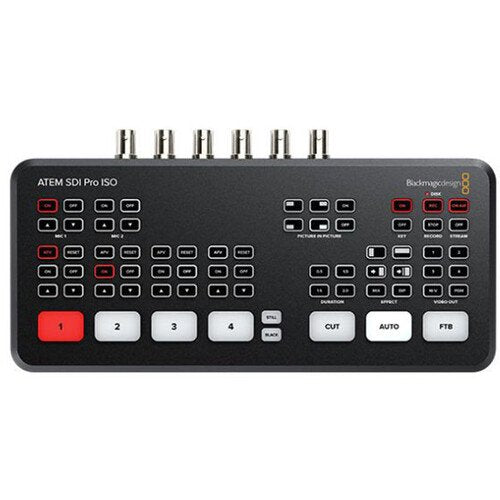
Blackmagic Design ATEM SDI Pro ISO Switcher
Blackmagic Design ATEM SDI Pro ISO Switcher
In stock
View full details WhatsApp us for inquiries

Blackmagic Design ATEM SDI Pro ISO Switcher — Product Guide
The Blackmagic Design ATEM ATEM SDI Pro ISO Switcher from is a four-input live-production switcher with a built-in control panel developed for multi-camera live broadcasting up to HD footage to the internet via Ethernet feed.
It incorporates a USB feed that enables you to capture the program feed as well as capture the individual 3G-SDI sources to an outboard USB drive (not supplied).
In addition to capture the program stream and individual sources, the ATEM Mini Pro ISO additionally records the embedded audio and analog audio sources, generating a DaVinci Resolve job file of your live stream.
This permits you to make your live workflow into DaVinci Resolve to make tweaks or adjustments through the source surface that is already on your USB drive.
The ATEM Mini Pro ISO retains the identical size, control layout, and rear-panel interface links as the ATEM Mini Pro, with new electronics that enable for the ISO capture and generation of the DaVinci job file.
The ATEM Mini Pro ISO handles all the same incorporates as the ATEM Mini Pro, among them upstream and downstream keyers, an enhanced chroma keyer, two linear/luma keyers, a DVE transition keyer, a pattern generator, and colour generators.
There is additionally media subject support for fill and key pictures, which allows up to 20 stills in PNG, TGA, BMP, JPEG, and TIFF formats.
The ATEM Software Control Panel is employed for control and configuration, and it permits you to display the files rate, audio meters, configuration, and status of your live feed.
And you can use the panel to location up broadcasting to an optional Blackmagic Design Broadcasting Bridge anywhere in the world, as long as it is connected to the internet.
For more information click here.
General: Guide
- Connecting a USB drive to the ATEM Mini Pro ISO's USB port enables capturing the switched program stream, up to four isolated (ISO) recordings of input video, and embedded audio, analog input audio, graphics, and a DaVinci Resolve project file of your switched program
- The device has the same footprint, layout, and connections of the ATEM Mini Pro
- Stream video up to 1080p HD
- Quick stream, on-air, and record buttons
- Hardware encoder so there's no need for additional streaming software
- Control and configure timecode, stream status
- Full support and control features for BMPCC 6K/4K cameras
- Simultaneous USB recording
- Integration with MultiDock for live hard drive switching
- Customize advanced settings with XML files
- Software multiview with program previews, graphics, record status, on-air status, and audio meters
- Program preview input and output buttons
- Tally light control for BMPCC 6K/4K cameras
- Automatic timecode sync for all cameras
Transitions: Guide
Available transitions include:: Guide
- Cut: When you press the cut button, ATEM instantly changes from your current program source to the preview source. Cuts can be performed by directly selecting sources or by pressing the cut button to switch to the next source.
- Mix: The mix, or dissolve, gradually transitions from one source to the next by creating a smooth blend. You can set custom timings to manually blend the transition.
- Dip: Just like mix transitions, a dip transition is a gradual blend that includes either a solid color, graphic, or another clip between the two video sources. Dips to black or white between sources are the most popular, or you can use logos or sponsor graphics.
- Wipe: Built-in wipe patterns include circles, diamonds, squares, and more. Shapes and patterns can be inverted or softened and can even have customized colored borders.
- DVE: With the powerful built-in digital video effects processor, or DVE, you can push, spin, squeeze, or swoosh your live video from one camera to the next with incredible built-in transitions. DVE transitions can be flip-flopped and reversed, giving you even more transition options.
Upstream Keyer: Guide
Dimension live footage over other footage inputs or graphics with the upstream keyer.
You can use the luma principal, linear principal, pattern principal, or shoot against a green display and use chroma principal to instantly composite the footage over virtual locations.
- Luma key: Luma keys work best with high-contrast images, like white elements on a black background, so you can use the contrast to cut the black background and replace it with live video or graphics.
- Linear key: Get clean, high-quality results with linear keying by using two separate sources for the fill and the key to create one video image. The fill signal contains the video to be stacked over the background, while the key signal contains a gray scale mask to cut out, or mask, the area to be filled.
- Chroma key: Used every day for TV weather forecasts, chroma keys are a powerful way of combining live images in real time. The presenter typically stands in front of a green or blue background and the chroma keyer will remove only that color and combine it with another image, such as a video or graphic.
- Pattern key: Combine live images with any of the built-in wipe patterns to combine live images or graphics with geometric shapes. You get full control over softness, symmetry, size, and position to create unique picture-in-picture effects that can be transitioned to as easily as any live source.
Downstream Keyers: Guide
The ATEM Mini switcher incorporates one downstream keyer, so you can attach high-quality graphics such as logos, bugs, and titles from the built-in media subject over the live stream program feed. Downstream keyers are the last layers of keying, so they overlay all footage switched to the main program feed.
sound Mixer
The built-in audio mixer lets you control both unit and outboard audio with accuracy level and equilibrium adjustments on all six provided audio sources and two channels. The mixer integrates selectable on/off and audio-follow-video per channel, plus it has standalone gain control per channel, level and peak metering, and new Fairlight audio enhancements such as compressor, gate, limiter, six channels of parametric EQ, and master gain control.
Monitor signal feed
You can configure the 3G-SDI feeds for multiview with several views, such as Program, Preview, 4 3G-SDI sources, SuperSource, clean feed, media subject, streaming status, capture status, and audio meters.
Media Player: Guide
Eliminate outboard character generators by storing up to 20 broadcast-quality RGBA graphic files in the media pool. The one media subject appears as source inputs to your switcher. You can transition to graphics as full-frame footage, or feed them to the keyers for overlaying footage. Popular picture formats such as PNG, TGA, BMP, GIF, JPEG, and TIFF are supported.
You can additionally visit here for more.
[caption id="" match="alignnone" width="1000"]
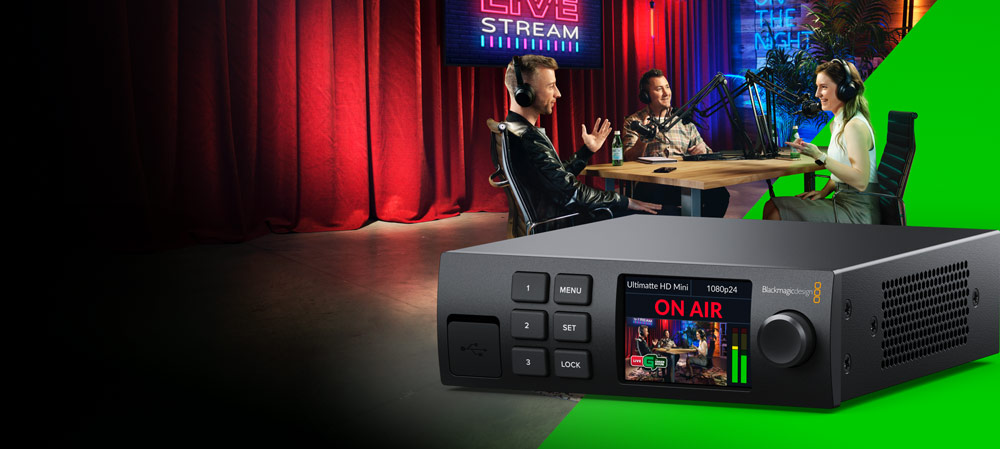 Blackmagic Configuration ATEM SDI Pro ISO Switcher [/caption]
Key Features
- 16 x 6G-SDI Inputs with Loop Outputs
- 1 x HDMI, 4 x SDI Multiview Outputs
- Supports SD, HD, Ultra HD 4K, DCI 4K
- 2 x 2, 3 x 3, 4 x 4 Multiview Grids
- Built-In LCD with Spin Knob Control
- Push Buttons on Front Panel
- Ethernet for Remote Control
- 1 RU Machined Aluminum Chassis
- Built-In Multi-Voltage Power Supply
Shop by Categories


Explore other brands


