


 SKU: SWATEMMXEPCEXTISO
Blackmagic Design ATEM SDI Extreme ISO Switcher
Blackmagic Design ATEM SDI Extreme ISO Switcher
In stock
View full details WhatsApp us for inquiries

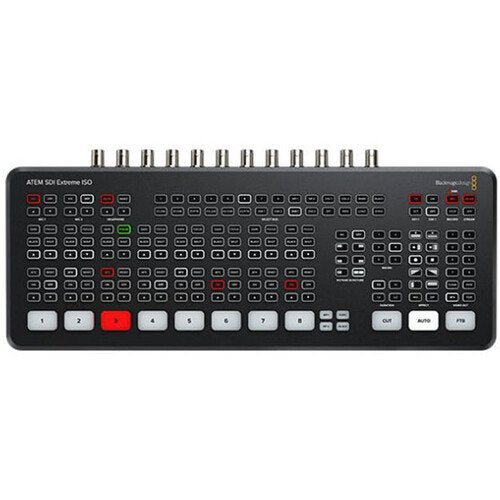
Blackmagic Design ATEM SDI Extreme ISO Switcher — Product Guide
The Blackmagic Design ATEM SDI Extreme ISO Switcher by is an 8-source live workflow switcher for live streaming.
It provides a built-in control panel and has enhanced broadcast provides.
In addition to live streaming through RTMP protocols, you can additionally feed your program as if it was a webcam over USB.
The switcher's ISO label means you can individually capture each of the eight source videos as a MP4, as well as the program feed through one of the USB Type-C ports.
The switcher without manual intervention generates a DaVinci Resolve job file, so you can clean it up and make changes later.
This versatile switcher's eight separate 3G-SDI sources accept all widely chosen HD feeds up to 1080p60.
Each source has discrete shot rate and format converters, and compatibility includes re-syncing for smooth switching between a selection of pro and consumer cameras, game consoles, and computer feeds.
Selector, add effects, colour grade, and principal in real time through the control surface's keys, or through the software control panel.
CCU functions are provided for controlling Blackmagic Soundstage and URSA Mini/Broadcast/Micro Soundstage cameras from the switcher.
The ATEM Mini Extreme ISO allows up to nine layers, with four upstream and two downstream keyers, up to four chroma keyers, up to four linear keyers, two DVE with borders and drop shadow, five pattern generators, and two colour generators.
Developed for live broadcasting or webcam, the Mini Extreme ISO has four 3G-SDI feeds to feed monitors and accommodates up to 16-display multiview.
You can additionally visit here.
Stream Live: Guide
Live stream to YouTube, Facebook Live, Skype, Twitch, zoom, Microsoft Teams, and other platforms that support RTMP protocols.
operation connection panel
The front panel incorporates easy-to-use buttons for selecting sources, footage effects, and transitions. The source keys are large, enabling you to operate them by feel. Supplied on the ATEM Extreme ISO are keys for audio mixing, capture, and broadcasting control, as well as feed selection keys that let you change the footage output between cameras, program, and multiview. On the rear panel, there are 3G-SDIconnections for cameras or computers, extra microphone sources, USB for webcam out, plus 4 x 3G-SDI "AUX" feeds for program video.
signal feed
You can feed using the Ethernet link to your installation or use the USB Type-C feed to deliver your switched show recognized as a webcam source by virtually any footage software such as zoom, Microsoft Teams, Skype, Open Broadcaster, XSplit Broadcaster, and others.
5G Phone compatibility and 4G
If you're doing live workflow on on-location, the ATEM Mini Extreme versions support connecting an Apple or Android phone to the USB port to use mobile files.
It's additionally a great backup for the main Ethernet link, so you don't drop your stream if your hardwired link gets interrupted.
He switcher will without manual intervention switch to through the phone as the primary link, and the USB port will additionally power your phone, so the battery won't drain.
Multiview Monitoring: Guide
You can configure the 3G-SDI feeds for multiview with 4, 7, 10, 13, up to 16 views such as Program, Preview, eight 3G-SDI sources, SuperSource, clean feed, media subject, streaming status, capture status, and audio meters.
Media Pool: Guide
The switcher can store up to 20 pictures with fill and principal, and it accommodates PNG, TGA, BMP, GIF, JPEG, and TIFF file formats.
Integration Support
It incorporates the ATEM Software Control Panel, and it is additionally compatible with the ATEM 1 M/E, ATEM 2 M/E, and ATEM 4 M/E Enhanced Panels.
The ATEM Mini Extreme ISO may be set up through Blackmagic's Videohub Hardware Panel Configuration utility to route inputs to destinations through Videohub Smart Control Pro and Videohub Master Control Pro.
recording production flow
The ATEM Mini Extreme versions support the direct capture of your broadcasting data to USB flash disks through the same H.264 footage files with AAC audio that you streamed.
The Mini Extreme ISO additionally permits you to capture the eight source footage channels as MP4 files.
The design supports you to straight upload to any online footage site, such as YouTube or Vimeo.
Capture to several disks is additionally supported through a USB hub or the Blackmagic MultiDock, so whenever a disk becomes full, capture can continue to a second disk for nonstop capture.
Capture settings and disk selection are location up in ATEM Software Control, and there's a capture status see in the built-in multiview.
You can even trigger capture on connected Blackmagic Pocket Cinematic production Cameras.
DaVinci Resolve Integration: Guide
The Mini Extreme ISO saves a DaVinci Resolve job file, so with a one click, you can open your live workflow as a footage edit.
All cuts, dissolves, and media pool graphics will be loaded, enabling you to tweak and edit your live workflow through the captured input footage.
If you captured the body originals as Blackmagic Raw unit files, you can relink those and make advantage of DaVinci Resolve's colour correction abilities.
video signal Effects
One of the assists of ATEM Mini is the professional workflow value possible through the range of built-in footage effects.
The cut button maintains an instant cut whenever switching between inputs.
The auto control is a professional term employed on large broadcast switchers to permit footage effect transitions.
There are duration keys for footage effects enabling 0.5-, 1-, 1.5-, and 2-second settings.
You can additionally choose the type of effect you require such as mix, which does a level transition between inputs, and dip, which fades through a colour during the transition.
Or use fun DVE effects that move the picture off-screen whenever transitioning between inputs.
Audio Capabilities
With two separate 3.5mm stereo audio sources, you can connect desktop and lapel mics, or you can connect a music subject to generate introduction music after the live stream commences but before the program starts.
With two extra stereo audio sources, you can maintain a range and guest both deliver lapel microphones whenever doing interviews.
All audio sources to the ATEM Mini incorporate buttons on the panel for refining audio level and enabling sources into the audio mixer.
All versions function a Fairlight audio mixer with all SDI sources, and both microphone sources are all connected to the audio mixer, so you can live mix from all audio inputs.
The ATEM Mini Extreme additionally adds a headphone feed.
Broadcast capabilities
Hiding in the ATEM Mini Extreme versions are a host of broadcast-caliber incorporates that are accessible whenever connected to a Mac or Windows computer running the free ATEM Software Control app.
Find out more here.
[caption id="" match="alignnone" width="1000"]
 Blackmagic Configuration ATEM SDI Extreme ISO Switcher [/caption]
Key Features
- 8-Channel 3G-SDI Live Streaming Switcher
- Supports up to 1080p60
- RTMP Streaming via Ethernet or USB-C
- Record Program Out and Individual Inputs
- 11-Input, 2-Channel Audio Mixer
- Input Frame Rate and Format Converter
- Re-Sync on All 3G-SDI Inputs
- HD Multiview Output with up to 16 Views
- Local and Software Switching
- 4 x Upstream, 2 x Downstream Keyers
Shop by Categories


Explore other brands


