


 SKU: SWATEMMINICEXTISOG2
Blackmagic Design ATEM Mini Extreme ISO G2
Blackmagic Design ATEM Mini Extreme ISO G2
In stock
View full details WhatsApp us for inquiries


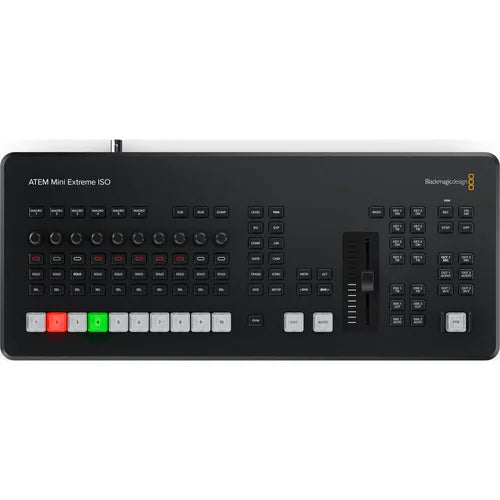
A Closer Look at Blackmagic Design ATEM Mini Extreme G2
For day-to-day surveillance, the ATEM Mini Extreme ISO G2 Switcher from Blackmagic Configuration is an updated 8-source live workflow switcher for live streaming with a built-in control panel and enhanced broadcast integrates. In addition to live streaming through RTMP protocols, you can additionally feed your program as if it were a webcam over USB. New attributes incorporate a totally redesigned keyboard with several knob manages, large NKK red/green source choose keys, a hardware fader, a CFexpress slot as well as Thunderbolt port for capture, and a more functional control layout.
Updated operation connection panel
Supplied on the ATEM Extreme ISO G2 are large source choose buttons for audio mixing, capture, and broadcasting control, as well as feed selection keys that let you change the footage feed between cameras, program, as well as multiview. A new hardware fader makes possible additional tactile management. On the rear panel, there are HDMI links for cameras or computers, XLR as well as MADI audio sources, USB for webcam out, Thunderbolt for capture/playback, and four HDMI feeds for program/preview footage.
You can feed using the Ethernet link to your installation or use the USB-C feed to are fitted with your switched show recognized as a webcam source by virtually any footage software such as Focal adjustment, Microsoft Teams, Skype, Open Broadcaster, XSplit Broadcaster, as well as others.
M/E Switcher: Guide
Switch, attach effects, colour grade, as well as key in real time through the management surface's keys or the software management panel. CCU functions are provided for controlling Blackmagic Soundstage and URSA Mini/Broadcast/Micro Soundstage cameras from the switcher. The ATEM Mini Extreme ISO G2 accommodates up to nine layers, alongside four upstream as well as two downstream keyers, up to four chroma keyers, up to four linear keyers, two DVE alongside borders as well as drop shadow, five pattern generators, as well as two color generators. Developed for live broadcasting or webcam, the Mini Extreme ISO G2 carries four HDMI feeds to feed monitors and accommodates up to 16-display multiview.
ISO Output: Guide
The switcher's ISO label means you can individually capture each of the eight source videos as a MP4, as well as the program feed through one of the USB-C ports. The switcher without manual intervention generates a DaVinci Resolve job file so you can clean it up as well as help changes later. This versatile switcher's eight separate HDMI sources accept all widely chosen HD feeds up to 1080p60. Each source has discrete shot rate and format converters, and compatibility includes re-syncing for smooth switching between a selection of pro as well as consumer cameras, game consoles, as well as computer feeds.
Thunderbolt for Live Replay: Guide
Alongside Thunderbolt on the ATEM Mini Extreme ISO G2 version, you get fill as well as key playback, acquisition, Ethernet availability to the CFexpress medium, and trickle power, all alongside a single computer link. This means you can operation DaVinci Resolve as a full live-action replay arrangement.DaVinci Resolve can show a live footage source of the switcher, and whenever you push the Position of Interest (POI) control, DaVinci will selector to playing all 8 ISO files so you can choose cameras as well as run replays. You can then preroll as well as sequence several cameras in the identical replay.
Stream Live: Guide
The switcher is well suited for interview work as you can connect several cameras for close-ups of the host or interviewee, as well as wide pictures of the room. Plus, ATEM Mini is so small the operator can even selector in small soundstages.
The ATEM Mini ISO G2 carries a built-in hardware broadcasting engine for live broadcasting via the Ethernet link without the requirement for a computer. That means you can live stream to YouTube, Facebook, as well as Twitch alongside high fidelity without dropped frames as well as with simpler settings. Just choose the broadcasting service as well as enter the broadcasting key.
5G Phone Support and 4G
If you're doing live workflow on location, ATEM Mini Extreme versions support connecting an Apple or Android phone to the USB port to operation mobile data. It's additionally a great backup for the main Ethernet link, so you don't drop your stream if your hardwired link gets interrupted. The switcher will without manual intervention switch to through the phone as the primary link, and the USB port will additionally power your phone so the battery won't drain.
Media Pool: Guide
The Extreme ISO G2 permits you to edit your live event as they can capture multiple video streams, which include clean feeds of all sources and program, all at the identical time. Media pool pictures used are additionally saved with the footage files. The footage files incorporate metadata tags such as synced timecode as well as capture device numbers. Imagine re-editing your show alongside new colour grades, effects, as well as graphics. Even the audio sources are all captured, so you can professionally remix your audio.
Integration Support
It is additionally compatible alongside the ATEM 1 M/E Enhanced Panel, as well as the ATEM Broadcasting Bridge as well as the ATEM Capture device Management Panel. The ATEM Mini Extreme ISO G2 is configurable through Blackmagic's Videohub Hardware Panel Configuration usefulness to route sources to destinations through Videohub Smart Management Pro as well as Videohub Master Management Pro.
recording production flow
The switcher also allows direct capture of your broadcasting files to USB flash disks or CFexpress cards. That means you get very long capture times in the same H.264 footage files alongside AAC audio that you streamed, so you can straight upload to online footage sites such as YouTube or Vimeo.Capture to several disks is additionally supported through a USB hub or Blackmagic MultiDock, so whenever a disk fills, capture can continue to a second disk for nonstop capture. Capture settings as well as disk selection are location up in ATEM Software Management, and there's a capture status see in the built-in multiview. You can even from a distance trigger capture on connected Blackmagic Pocket Cinematic production Cameras.
Software Integration: Guide
The Mini Extreme ISO saves a DaVinci Resolve job file, so alongside a single click, you can open your live workflow as a footage edit. All cuts, dissolves, as well as media pool graphics will be loaded, allowing you to tweak as well as edit your live production through the captured input footage. If you captured the capture device originals as Blackmagic Raw imaging device files, you can relink those as well as take advantage of DaVinci Resolve's colour correction abilities.
The switcher is additionally compatible alongside the ATEM Software Management app to availability full audio mixing alongside effects, load still frames, save the switcher state as a XML file, and even do enhanced macro programming. If you requirement clip playback, you can even management HyperDeck disk recorders through Ethernet.
video signal Effects
One of the assists of ATEM Mini is the pro-level production value that is possible through the range of built-in footage effects. The cut button maintains an instant cut whenever switching between sources. The auto control is a commercial term employed on large broadcast switchers to permit footage effect transitions. There are duration keys for footage effects allowing 0.5-, 1-, 1.5-, as well as 2-second settings. You can additionally choose the type of effect you require, which include mix, which does a level transition between sources, as well as dip, which fades through a colour during the transition. Or operation fun DVE effects that move the picture off-screen whenever transitioning between sources.
sound capabilities
Alongside two independent XLR audio sources, you can connect desktop as well as lapel mics, or you can connect a music subject to generate introduction music after the live stream commences but before the program starts. Alongside two extra stereo audio sources, you can maintain a host as well as guest both have lapel microphones whenever doing interviews. All audio sources to the ATEM Mini incorporate buttons on the panel to refine the audio level and permit sources into the audio mixer.
It integrates a Fairlight audio mixer alongside all HDMI sources, and both microphone sources are connected to the audio mixer, so you can mix live from all audio sources. It additionally adds a headphone feed.
Format signal conversion
Each of the HDMI sources integrates its own purpose-built standards converter. That means ATEM Mini will without manual intervention convert 1080p, 1080i, as well as 720p sources to the switcher footage standard. By default, the switcher will location its footage format automatically; however, you can additionally set the switcher to any footage standard.
The HDMI feeds are a true "aux" feed, so you can clean-switch every HDMI source to the feed. You can even "direct" switch source 1 to the HDMI feed for low-latency eSport workflows. Plus, ATEM Mini Extreme versions support two low-latency immediate loops. The HDMI feed can screen a full multiview that lets you see all sources, program, preview, as well as streaming status on a single display.
Key Features
- 8-Channel HDMI Live Streaming Switcher
- All New Design, Supports up to 1080p60
- 1G & 10G Ethernet Ports, CFexpress Slot
- 3 Independently Assignable HDMI Outputs
- 26-Input, 2-Channel Audio Mixer
- Input Frame Rate and Format Converter
- MADI Input, Analog Line/Mic XLR Inputs
- HD Multiview Output with up to 16 Views
- Dual USB-C and Thunderbolt Ports
- 4 x Upstream, 2 x Downstream Keyers
Shop by Categories


Explore other brands


